AI trend

Welcome 2027 AI Video: Bring Your New Year Climb to Life

Welcome 2027 AI Video brings one photo into a 5-second vertical climb, a welcome pose and a marble 2027 reveal.

Choose Human; allow 2–5 minutes for generation.

WELCOME 2027 AI VIDEO
VIRAL RIG
1 Photo5s HD

WELCOME 2027 AI VIDEO

Make a Welcome 2027 marble climb from one person photo.

Swipe ⟷
Example

What does a Welcome 2027 AI Video look like today?

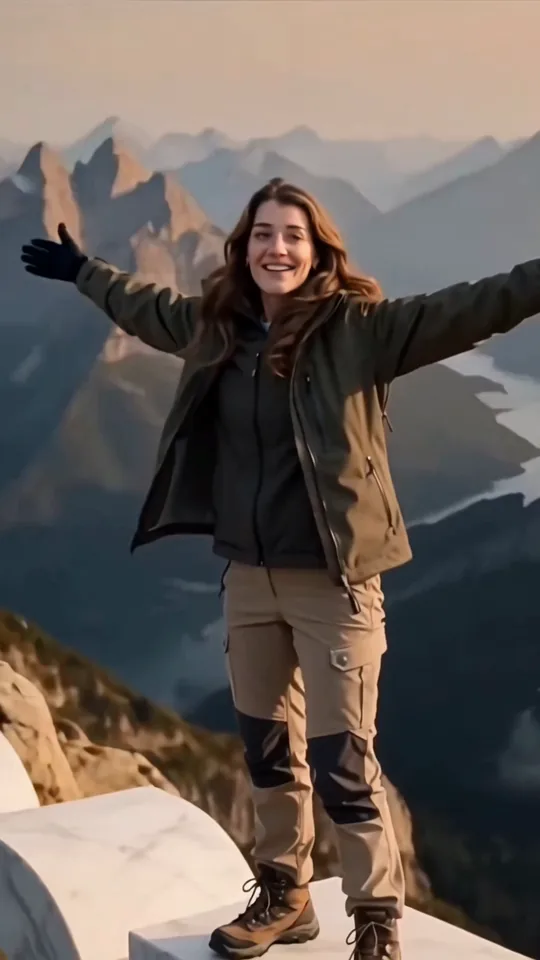
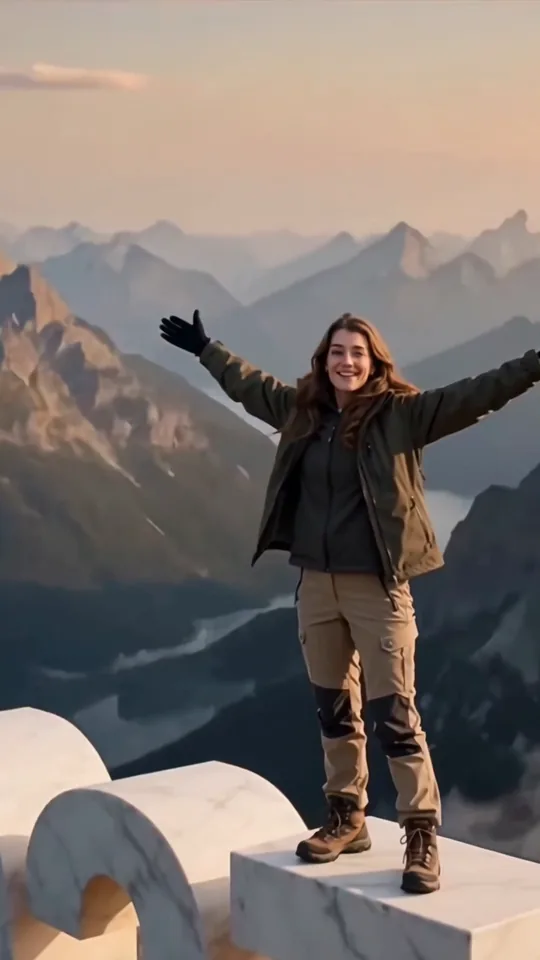
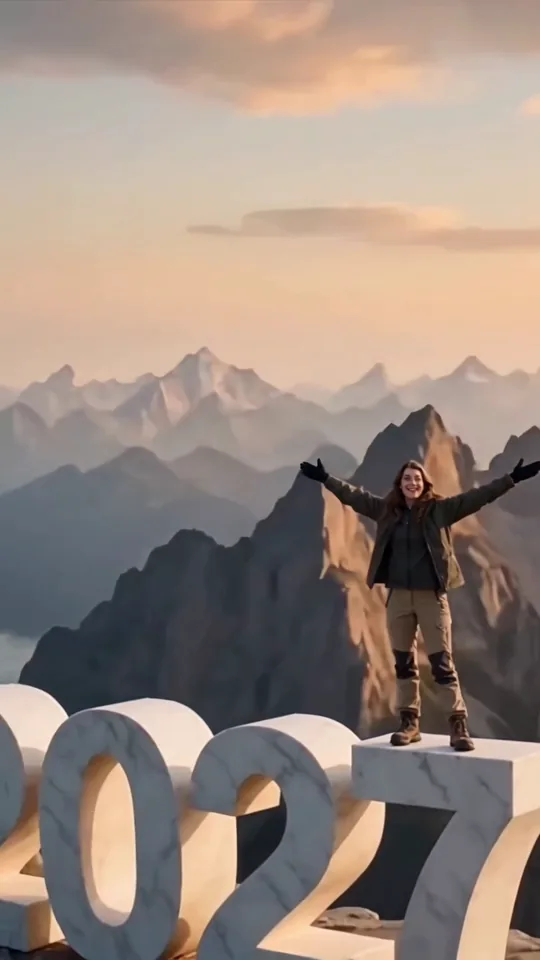
A single uploaded person appears in a warm mountain scene, climbs over a white marble structure, stands and opens both arms above oversized 2027 numerals. The showcase uses five observed moments to mark the marble climb and reveal.

Human
9:16 Vertical·Clean MP4
Ready to Remake

Upload your photo to star in this exact scene in 3 minutes.

Remake ↑
Second by second

How does the welcome 2027 video effect build its reveal?

Five observed beats give the welcome 2027 effect a clear arc. The welcome 2027 video effect has five visible changes: a two-hand grip, a crawl over the marble top, a rise from a crouch, a wide welcome pose and a final view of the 2027 numerals. Five selected frames show the climb to the reveal. Each frame is an observed moment from the original clip, while your generated result can vary.

Reference clip · Clip time

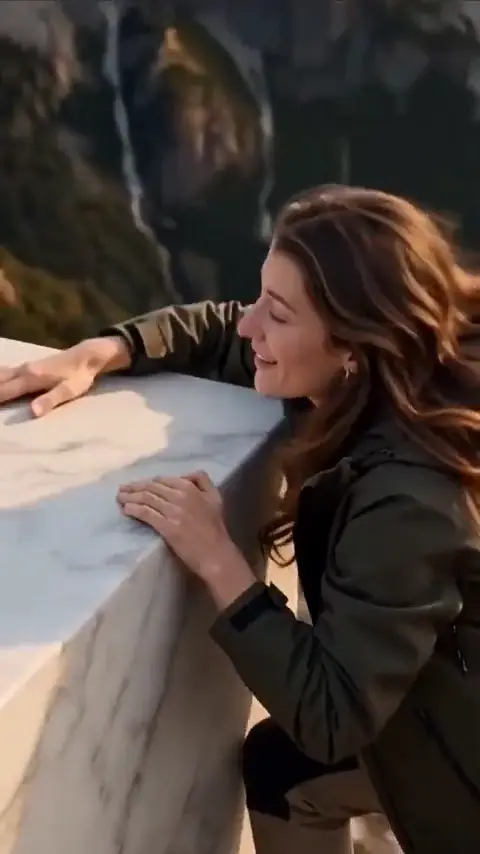
  1. Person gripping a white marble edge above the mountains
    Clip time 0.8 s

    Grip the marble edge

    Both hands catch the white marble edge as the climb begins.

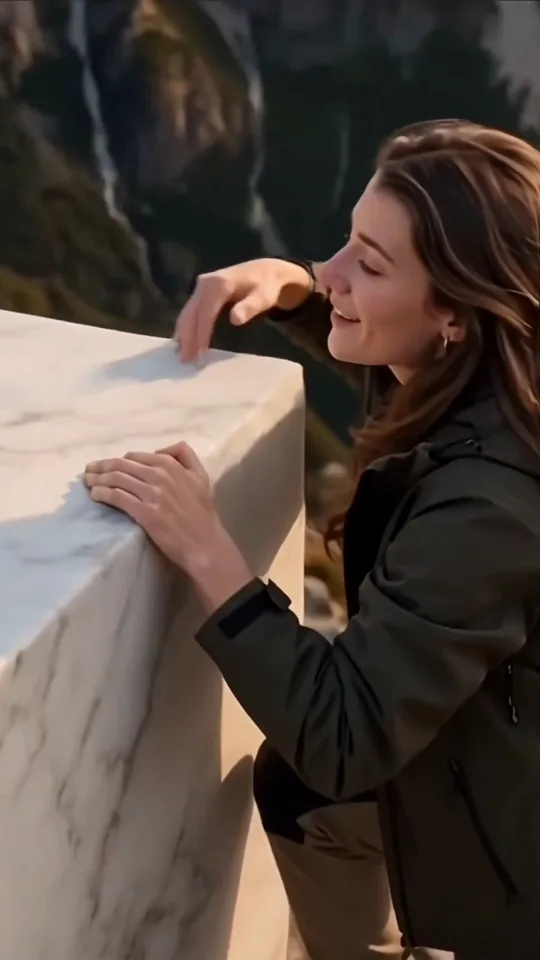
  2. Person crawling over a white marble platform
    Clip time 2.1 s

    Crawl over the top

    The climb moves forward across the marble surface.

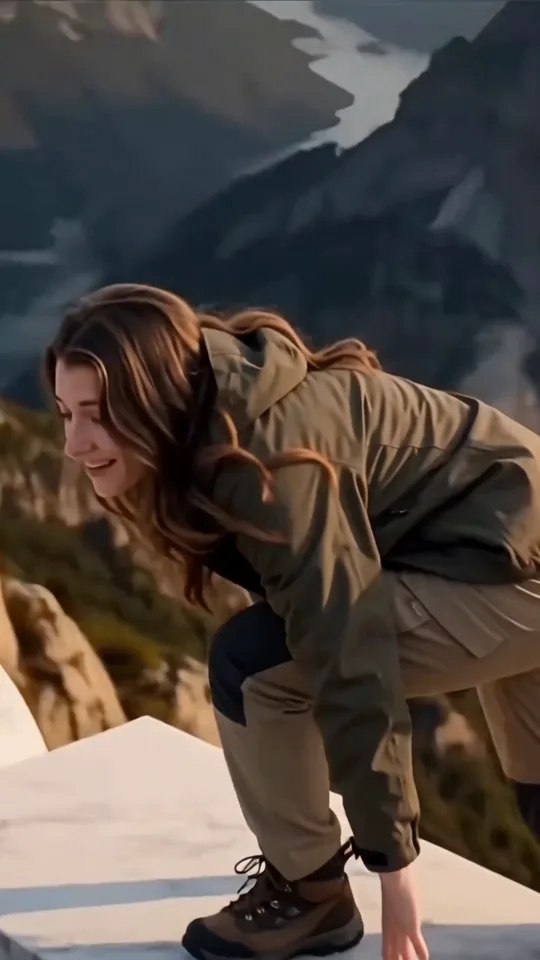
  3. Person rising from a crouch on a marble platform
    Clip time 3.0 s

    Rise from the crouch

    The performer comes upright on the platform.

  4. Person opening both arms against layered peaks
    Clip time 3.6 s

    Open both arms

    The welcome pose opens toward the valley.

  5. Smiling person above large white 2027 numerals
    Clip time 4.7 s

    Reveal the 2027 numerals

    The view widens to the smiling pose above the marble numerals.

Human keeps one uploaded person identity across the five movement frames.

Step by step

How do I make a Welcome 2027 AI Video from one photo?

Start with one photo that shows the person clearly, then let Human carry that identity through the original vertical scene. One photo controls the performer identity; the marble structure, mountain valley and camera arc follow the camera path.

  1. 01Step 1

    Add one photo

    Choose a clear image with the face, shoulders, legs and shoes visible. A complete view gives the model enough information for the opening grip, the crouch and the final stance. Avoid a hand over the face, a heavy filter or a crop that removes the lower body. Before uploading someone else’s photo, confirm that person has given consent and read the privacy policy.

  2. 02Step 2

    Check the preview

    Select Human, confirm the 9:16 ratio and review the charge shown by the product before generating. The requested output is five seconds, so the climb and the final hold need to remain in one short arc. The preview helps you check the intended framing before you share the result.

  3. 03Step 3

    Review and download

    Play the result from the first grip to the 2027 hold. Look for a recognisable face, stable hands on the marble, readable numerals and the original sound. If any of those checks fail, use the fixes below before sharing.

Who to cast

Who is a welcome 2027 effect video for?

A welcome 2027 effect video suits a person making a New Year greeting, a travel-memory post or a private milestone clip. The Human version keeps the story to one photographed subject, so the viewer sees that person arrive at the new year rather than a crowd being added around them.

  • Human · 1 photo

    A welcome 2027 New Year greeting

    Human takes 1 photo when you want your own look to carry a short welcome into the next year.

  • Human

    A welcome 2027 travel memory

    The layered mountains, warm sky and marble numerals give a simple portrait a clear location and a strong last frame.

  • Human

    A welcome 2027 milestone worth sharing

    The climb and welcome pose can mark a change without adding another participant.

Why here

Why use this welcome 2027 prompt workflow?

This welcome 2027 prompt workflow makes the input and output explicit. It binds one photo to the performer, keeps the marble structure as the environment and states that the source audio is retained without guessing its content.

  • Identity

    One photo keeps the marble 2027 performer personal

    The Human version has one required person photo, so you can check the face and body against one source image before rendering.

  • Movement

    The marble climb stays legible

    The original scene keeps the grip, crawl, rise, welcome pose and final 2027 reveal in order.

  • Sound

    Original audio stays in the final file

    The original video includes sound; the source audio is retained as one continuous original track. Review the exported file before posting.

Copy and paste

Which welcome 2027 video generator prompt can I read first?

The welcome 2027 video generator prompt below is the public version of the Human plan. It describes the visible scene in ordinary language so you can understand the intended result before spending credits; the generator handles the technical setup.

Human

1 photo · 5 s · 720p · 9:16 · 334 credits

Video prompt

Create a 5-second vertical 9:16 Welcome 2027 scene with [Image 1], one uploaded person photo.

Show a tight marble-edge close-up first, then a crawl over the white marble structure, a low crouch on the platform, and an arms-open welcome pose as the camera reaches a vertical wide reveal. Keep the person’s face, hair, body and clothing consistent while the background photo is removed. Keep the large white 2027 numerals, layered mountain peaks, warm peach sky, smiling face and original sound timing. Do not add people, captions, logos or watermarks.

Beat guide:
00:00–00:01.1: grip the marble edge and pull upward.
00:01.1–00:02.5: crawl forward over the white marble top.
00:02.5–00:03.3: rise from the crouch onto the platform.
00:03.3–00:04.2: open both arms in the arms-open welcome pose.
00:04.2–00:05.0: widen to the smiling 2027 reveal and hold.
Credits

What does a welcome 2027 effect cost?

The Human version is a 5-second 9:16 scene with one required photo. Choose 720p or 1080p before starting; the displayed credit amount belongs to the selected quality, while the movement stays the same.

Specs and credits
2 Rows
VersionPhotosLengthFormatQualityCredits
Human15 s9:16720p334
Human15 s9:161080p500
← Swipe horizontally to view full parameters →

Quality changes the credit charge, not the one-photo scene, five-second duration or 9:16 ratio.

The smallest one-time pack that covers the dearest version is $9.90 for 1,500 credits; credits do not expire. See pricing and credit packs.

Troubleshooting

Why can a welcome 2027 effect look wrong?

Separate identity drift from marble geometry. A recognisable face can still need a second pass on the hands, wide framing, numerals and sound.

Problems and fixes
5 Rows
ProblemFix
The face drifts during the climbThe upload does not show the face clearly. Use a clear, front-facing photo and render again.
The marble edge changes shapeThe source structure is small in the photo frame. Use the Human version with a sharper upload and render again.
The final numerals are croppedThe source framing is too tight. Keep the 9:16 ratio and render again.
The original sound is missingThe export was muted or re-encoded without its audio stream. Check the exported file and render again with original sound enabled.
The photo is rejectedThe upload does not meet the site's photo requirements. Choose another permitted photo; eligible credits follow the refund policy refund policy
← Swipe horizontally to view full parameters →

Check the face, structure, framing and audio as four separate review points before sharing.

FAQ

What else should I know about welcome 2027 effect?

Is a welcome 2027 photo safe to upload, and how long is it kept?

Use a photo you own or have permission to use. Read the privacy policy for current storage and deletion terms before uploading.

How is this different from other AI video tools?

Other tools may ask for a different reference format or build a different camera move. Compare their own current instructions before assuming that a one-photo, 5-second 9:16 workflow behaves the same way.

Can I post a welcome 2027 effect on TikTok or Instagram?

You can share an export when you have permission for the photo and audio. Check each platform’s current AI-label and music rules, and watch the file once before publishing.

Why does the face not look like me?

A small, angled or partly covered source photo gives the performer less identity information. Try a clear photo and compare the opening face, crouch and final smile separately.

Can a welcome 2027 effect keep its sound after downloading?

Yes. Replace it in an editor if you have the rights to the new track; if you want the original sound, verify that the exported file still contains it before posting.

Is the welcome 2027 effect scene a real location?

Treat the scene as a generated example based on the original clip. The marble numbers and valley are part of the generated setting.
✨Make Video With Your Photos

Make Your Welcome 2027 AI Video Video Now

Bring one photographed person into the welcome 2027 climb, pose and marble reveal.

Written and maintained by MemeVideoMaker Editorial DeskPublished Last updated