How to Make the You Never Let Her Pay Trend
To make the You Never Let Her Pay trend, upload a clear adult portrait in Reference to video and describe three moments: refuse the date’s card, reveal a kitchen sponge, then head to the dishes. Generate a vertical clip, check the result, and add your caption and permitted sound.
Open the Never Let Her Pay generator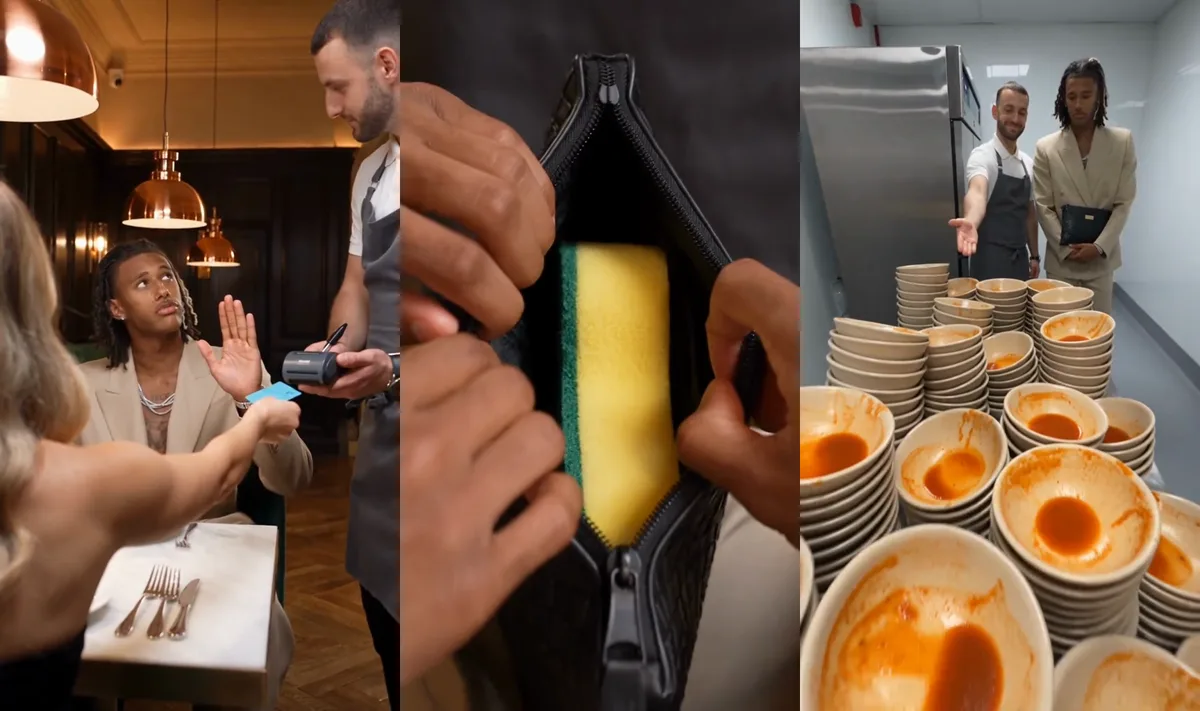
For the preset workflow, open the Never Let Her Pay AI trend generator and upload one portrait. To customize the scene with your own prompt, follow the steps below.
Start with: one portrait, the copyable prompt below, and the Reference to video studio. Results may need editing or another attempt; no restaurant shoot is required.
What is the You Never Let Her Pay trend?
The You Never Let Her Pay trend is a restaurant comedy skit: a diner insists on paying, opens a wallet containing a kitchen sponge, and gets sent to the dishes. The sponge reveals how they intend to cover dinner. Searches also call it the sponge wallet meme, I got this or Dinner’s On Me.
Plan the sponge-wallet video before you generate
Try this 10-second editing plan. These are suggested timings, not measured retention data or guaranteed AI cuts.
On phones, swipe wide tables to see every column.
| Beat | Suggested time | Share of the cut | What must be visible |
|---|---|---|---|
| Confident offer | 0–3 seconds | 30% | The date offers a card; the diner waves it away |
| Sponge reveal | 3–6 seconds | 30% | An open black pouch and a recognizable yellow-and-green sponge |
| Kitchen payoff | 6–10 seconds | 40% | The same diner beside dirty dishes, with the waiter indicating the job |
Timing summary: offer 3s, reveal 3s, kitchen 4s; 30% + 30% + 40% = 100% of this suggested cut.
Film editor Walter Murch’s Rule of Six, explained by Adobe, prioritizes emotion, story and rhythm. Here, let viewers recognize the sponge before cutting to the dishes.
Measured demo facts versus your output settings
| Item | Verified value | What it describes |
|---|---|---|
| Demo duration | 13.071 seconds | Supplied MP4 container duration, rounded to 3 decimals |
| Demo dimensions | 576 × 1024 pixels; 9:16 | The video above, not a promised export resolution |
| Demo video | H.264; 30 fps | Supplied video stream |
| Demo audio | AAC; 44.1 kHz | Supplied audio stream, not proof of music rights |
| Suggested first attempt | 10 seconds; 9:16; 720p | Settings to select for this tutorial |
Specification summary: this demo is a 13.071-second vertical H.264 MP4, 30 fps, with 44.1 kHz AAC audio. Generated files can differ.
How to make You Never Let Her Pay with AI
1. Choose the person who offers to pay
Use an evenly lit upper-body portrait of yourself or a consenting adult. Keep the face and hair visible; avoid sunglasses, face-covering hands and group photos.
Prepare a JPG, PNG or WebP within the displayed 10 MB limit, with a short edge of at least 320 pixels. A sharper portrait is preferable.
2. Open Reference to video and set the scene
Open the AI reference video generator, select MiniMax H3, and add your portrait under Images as Image 1. Paste the prompt below. Select 9:16, 10 seconds and 720p.
Reference mode uses your portrait in a new setting. Image to video starts from your supplied frame: use that when you already have a restaurant scene ready to animate.
3. Review the quote, then generate
Sign in and confirm upload permission. Prices checked November 17: MiniMax H3 costs 25 credits/second at 480p, 35 at 720p and 55 at 1080p. Ten seconds with one portrait and no reference video costs 250, 350 or 550 credits, respectively.
Check the live quote and current pricing. Reference videos and retries can add costs. Prices were checked against the studio configuration; we have not run a paid generation test for this guide.
4. Review the reveal and download
Watch with sound and muted. Check the diner’s identity, visible sponge and kitchen ending. Download the usable sequence, then add the POV caption in your editor for precise spelling and placement.
Copy a You Never Let Her Pay prompt
Paste this editorial template with one identity photo in Reference to video. Change the clothing description for another look.
Create a 10-second vertical restaurant comedy. Image 1 is the paying diner: keep their face and hairstyle consistent, dressed in a beige dinner jacket. The adult date and waiter are separate characters. At the table, the date offers a card; the diner confidently waves it away. Cut close to a black pouch opening on one yellow-and-green kitchen sponge. Pause on the awkward reaction. Finally, the waiter leads the same diner to stacked dirty plates in the kitchen. Keep the sponge consistent and hands natural. Use restaurant ambience; no dialogue, music, captions or logos.
Open the studio for your You Never Let Her Pay video after copying the prompt.
If a beat is missing, generate separate offer, reveal and kitchen clips, then trim and join them. An already-open pouch in a starting image simplifies the reveal. Check each extra clip’s quote.
AI, CapCut or filming: which route fits?
| Route | What you supply | Best fit | Main limitation |
|---|---|---|---|
| Reference-to-video AI | Portrait and scene prompt; optional permitted reference clip | A new version starring your likeness | Faces, props and cuts need review |
| CapCut edit or template | Your footage or the assets requested by a specific template | Arranging shots, captions and sound | An editing template alone does not guarantee a new personalized scene |
| Film it yourself | Phone, consenting actors, pouch, clean sponge and a kitchen setup | Exact acting, real hands and your own comic timing | Requires staging and editing |
Workflow summary: use AI to generate scenes, an editor to assemble and caption them, or filming when you need precise physical performances.
For filming, capture a medium refusal shot, pouch close-up and wide kitchen reaction at an agreed location. Avoid AI for documentary footage, exact likeness in every frame or guaranteed single-attempt results.
Fix a missing sponge, changing face or weak ending
| Problem | What to change on your next attempt |
|---|---|
| Sponge becomes a card or disappears | Give the reveal its own shot; start with a visible sponge in an open pouch |
| Diner and waiter swap faces | Keep Image 1 assigned only to the paying diner; remove extra identity photos |
| Hands merge around the zipper | Simplify the gesture; show an already-open pouch instead |
| Kitchen ending is missing | Generate a separate ending with the same portrait and clothing description |
| Joke is unclear without sound | Make the offer, prop and dirty plates readable before adding music |
Check your You Never Let Her Pay video before posting
Tick these as you review your export:
Caption ideas: “POV: You never let her pay,” “I said I’d cover dinner. I didn’t say how,” or “My wallet came with a work assignment.”
TikTok requires labels for realistic AI content: open More options → AI-generated content before posting. Generated ambience is not the original track; choose permitted sound. For promotions, check TikTok’s commercial music guidance.
For another restaurant joke, try First Time in a Fancy Cafe, or browse AI video trends.
Questions
Can I make the You Never Let Her Pay trend from just one selfie?
Yes. Use one clear adult portrait in Reference to video plus the scene prompt. The photo identifies the diner; the prompt supplies the story. Review likeness and missing beats before posting.
Is the You Never Let Her Pay video free, and how long will it take?
It uses credits: the checked 10-second, 720p MiniMax H3 configuration costs 350 with one photo and no video reference. Check the live quote. Rendering time varies; allow time for revisions.
Can I include my partner, friend or pet?
For a two-person experiment, assign Image 1 to the diner and Image 2 to the date or waiter in reference mode. Pet gestures need a separate prompt; this human sequence is untested for pets.
Is uploading my photo safe, and how long is it stored?
Our privacy policy states 24 hours for uploaded photos/intermediate media and 30 days for finished media. Running tasks can retain inputs longer. Processing involves service providers; only upload photos you have permission to share.
Do I need CapCut, Viggle or Higgsfield to make this?
No. This guide uses MemeVideoMaker’s reference studio plus optional editing. For alternatives, check identity-photo, scene-prompt and video-reference support in the selected mode. We have not benchmarked those tools for this skit.
Can I post my AI sponge-wallet video on TikTok or Reels?
Yes, subject to platform rules and rights to the faces and audio. Label realistic AI content, preview the crop and captions, and present the dinner as fictional. Exporting does not grant music rights.
Where do I find the original You Never Let Her Pay clip and sound?
Search the phrase with “sponge wallet” in TikTok, then open a creator’s post and sound page. No first creator or official sound is verified here. Credit the version you reference and check sound permissions.
Make your You Never Let Her Pay video
Upload one portrait to the Human preset and check the credit quote before generating.
Written by
MemeVideoMaker Editorial Desk
AI video guides and source checks
Continue Reading
Recommended Next Reads

Nov 9, 2026
How to Make "I Love The Smiths" Scene: 2026 AI & Filming Guide
Learn how to make the "I love The Smiths" scene from 500 Days of Summer. Follow our manual filming guide or create a 15s AI elevator video from 2 photos in 3 min.
Nov 9, 2026
The “I Love the Smiths" Trend and the 500 Days of Summer Elevator Scene
What is "I love the Smiths trend"? Discover the 500 Days of Summer elevator scene, The Smiths soundtrack, and how to create your 15s AI parody video.

Nov 5, 2026
How to Make Bicep Heart Trend Video: 2026 Step-by-Step AI & Manual Guide
Learn how to make bicep heart trend video on TikTok and Reels. Master the physical pose or create viral Solo & Duo Heart AI videos in under 3 minutes.