AI trend

Rollie on My Wrist Trend AI: Put Two Friends in the Carry

Rollie on My Wrist Trend AI turns two solo photos into a 9-second video of one friend carrying the other through a turn.

ROLLIE ON MY WRIST TREND AI
VIRAL RIG
2 Photos9s HD

ROLLIE ON MY WRIST TREND AI

Turn two photos into a shoulder-carry reveal, with one person carrying and the other coming into view on the turn.

Swipe ⟷
Example

What does a Rollie on My Wrist Trend AI clip look like?

One friend does the carrying and the other gets the surprise close-up. Play the example to see how the frame is shared.

Duo
9:16 Vertical·Clean MP4
Ready to Remake

Upload your photo to star in this exact scene in 3 minutes.

Remake ↑

The example shows how the movement works. Each new generation can vary in facial expressions and timing, even when you use the same photos again.

Second by second

What happens in the Rollie on My Wrist Trend video?

The Rollie on My Wrist Trend video works because your attention changes hands inside one continuous shot. Watch where the bodies stay connected as the face at the center changes.

Reference clip · Clip time

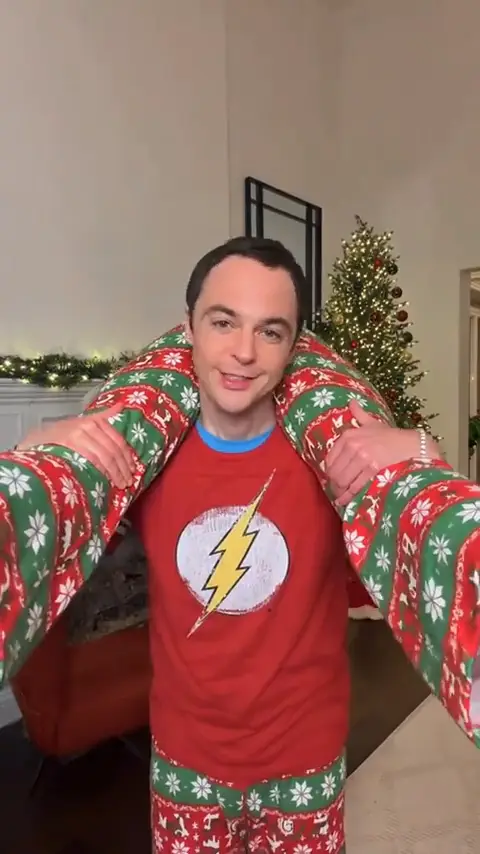
  1. Man facing the camera with a watch at chest height and a pajama leg over each shoulder.
    Clip time 1.9 s

    The watch between two knees

    The carrier brings a metal wristwatch across his chest while holding the rider's leg. The first face framed by those legs answers who is carrying whom.

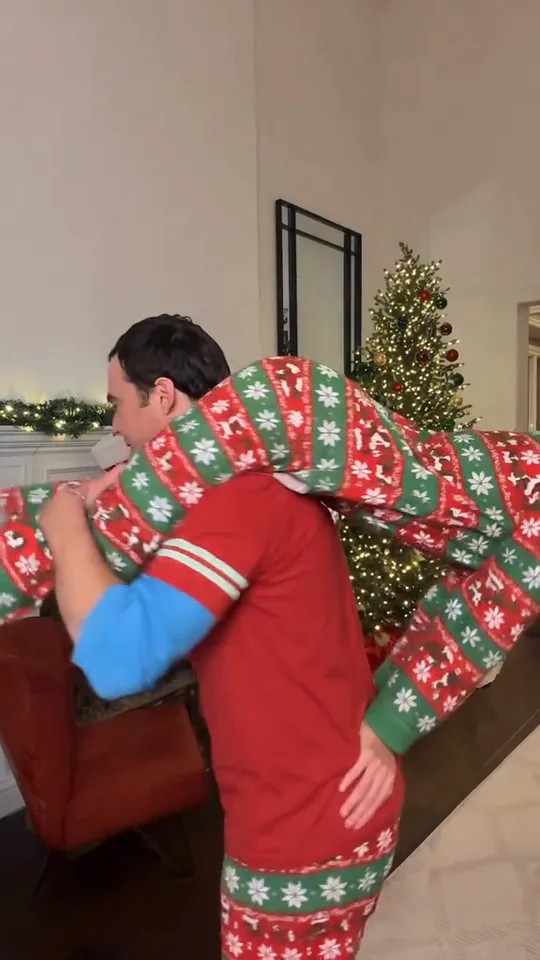
  2. Red-shirted carrier in profile with the rider lying across his shoulders and a rider's hand against his side.
    Clip time 3.5 s

    The carry seen from the side

    As the carrier turns, the rider's patterned torso lies across the shoulders in profile. That contact point explains how both people move together through the turn.

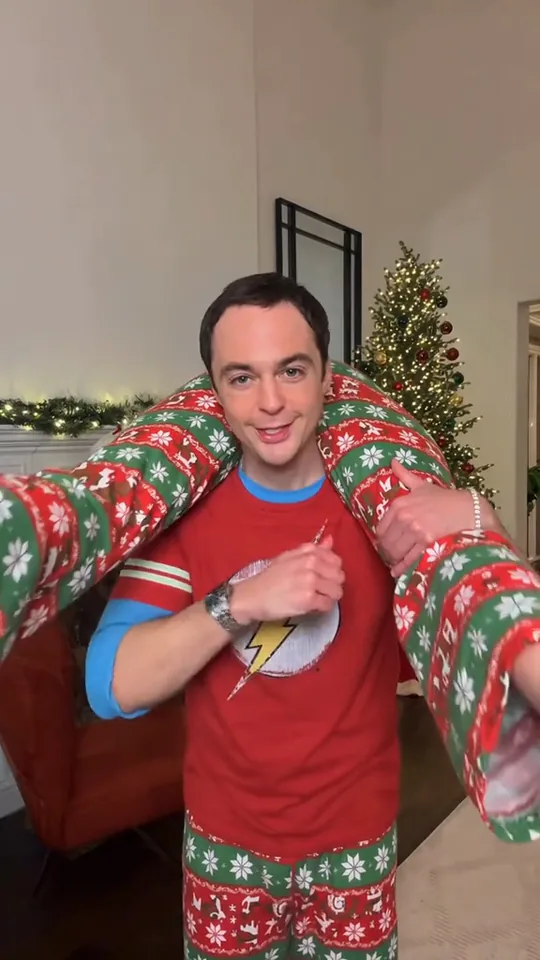
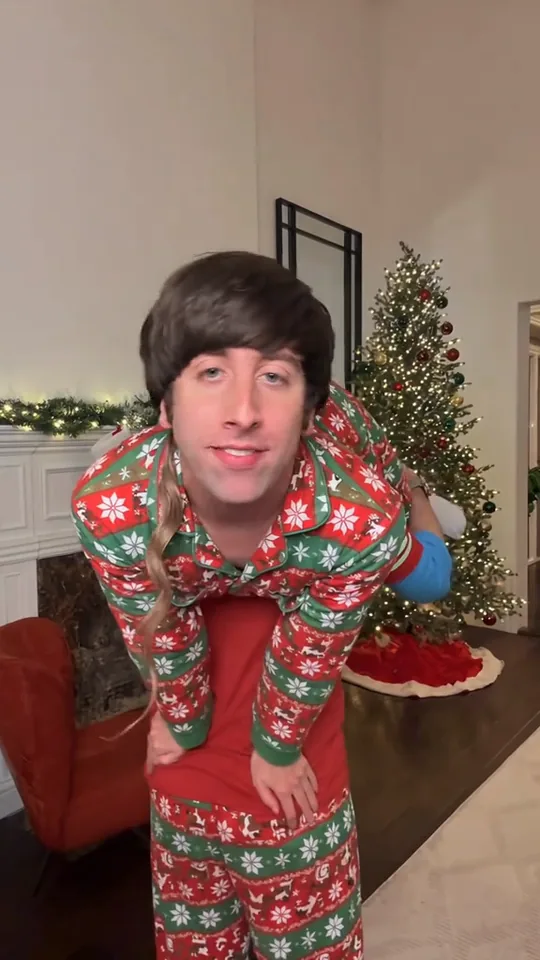
  3. Rider looks straight ahead with both palms on the carrier's red back and a blue sleeve visible behind.
    Clip time 4.8 s

    A new face above the same back

    The rider's face comes to the center, above both palms on the red shirt. A blue sleeve is still visible behind, showing the two bodies that make the close-up.

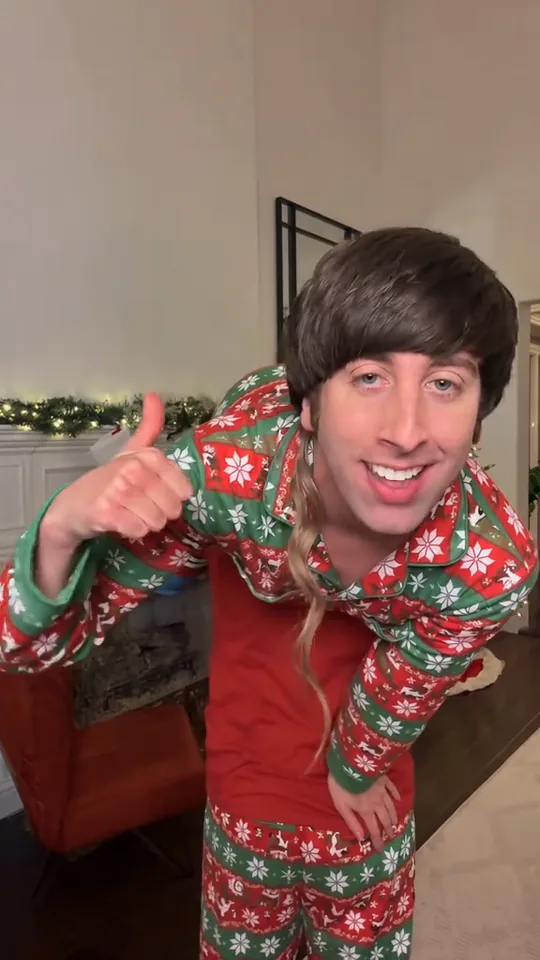
  4. Smiling rider gives a thumbs-up beside his face with his other hand braced on the carrier.
    Clip time 7.5 s

    One hand leaves the back

    The rider smiles and raises a thumb while his other hand stays low against the carrier. The gesture gives the rider the last word while both stay in the carry.

Step by step

How do you make the Rollie on My Wrist Trend with two photos?

Make the Rollie on My Wrist Trend with two photos by adding the person who carries first and the person who rides second. Decide who gets the surprise close-up before you start.

  1. 01Step 1

    Add your photo

    Put the person who opens the clip in Carrier and the person on the shoulders in Rider. Use photos you have permission to upload. They are used for your request, as explained in the privacy policy.

  2. 02Step 2

    Press Generate

    Check the two names against the role labels and check the price on the button before you press it. If the names are reversed, change the uploads before you spend credits.

  3. 03Step 3

    Download or share

    Save the whole clip and send that to the friend who appears with you. If you shorten the export for a post, leave the opening intact so the second person still gets an entrance instead of appearing without a setup.

Who to cast

Who should play each part in the Rollie on My Wrist Trend?

Cast one person who can sell the opening and one whose arrival makes your friends laugh. A pair that already has a running joke can make the reveal feel like the punch line to it.

  • Duo

    The couple who shares the joke

    Duo takes two photos, one of each of you. The #couple take by @nataliireynoldss is a casting cue: give the final look to the person who usually gets the last word. Save the opening for the partner who can play it straight.

  • Duo

    Duo's deadpan carrier

    Put your most serious friend in the carrying role. The more ordinary they make the opening feel, the funnier it is when the friend who can barely hold back a laugh gets the camera to themselves.

  • Duo

    Duo's surprise rider

    Cast the friend who usually takes the group photo as the rider. The late entrance lets their appearance be the whole joke, especially when you show the clip to people who expect only the first person to be in it.

Skip this setup if you want an equal, side-by-side portrait of both people. The two parts offer separate turns in the spotlight. It's a good fit when the person who normally steals the photo is willing to share the clip with someone who usually stays out of it.

Why here

Do you need CapCut for the Rollie on My Wrist Trend?

You can make the shoulder carry here without installing CapCut. Choose based on whether you want to place people into a clip you edit or cast the two parts in a prepared scene.

Ways to make it
2 Rows
Way to make itWhat you needWhat you get
((CapCut shoulder reveal tutorialhttps:
www.tiktok.com/@luciatui04/video/7707622166229044502))
CapCut and your own media to follow along
Duo generatorA separate picture for each partA finished shoulder carry clip for your chosen pair
← Swipe horizontally to view full parameters →

Watch the walkthrough to see the editing steps, or choose Duo to cast your own pair in a prepared scene.

  • CapCut route

    Find the shoulder reveal in the CapCut tutorial

    Look for the shoulder reveal when you choose a walkthrough. A search for Rollie can also turn up edits about the watch or the song where nobody is carried.

  • Casting

    Reuse a Duo pairing

    Duo keeps the two casting choices separate. You can keep the person who usually plays the straight man and try a different friend for the second half without choosing a different scene.

  • Export

    Edit a copy of your Duo MP4

    The Duo download is a playable MP4 you can import as a video clip into an editor. If you want to add a caption or end card, edit a copy and keep the original download for another cut.

Copy and paste

Is there a Rollie on My Wrist Trend prompt you can copy?

The Rollie on My Wrist Trend prompt is available to copy, and Duo already uses its own instructions when you press Generate. The public version is useful if you want to understand the shot before using it elsewhere.

Keep the camera in the same place in your own version. Write down who takes each role before describing the movement. When you change a prompt, keep the casting sentence intact so that the direction for the second person still points to the correct photo.

Show full details

Duo

2 photos · 9 s · 720p · 9:16 · 600 credits

Video prompt

Keep the camera planted in a warmly lit living room, with a red armchair, mantel garland and a lit Christmas tree.

[Image 1] supplies the person standing underneath. Use [Image 2] for the adult already lying over their shoulders. Take each person's face, hair, skin tone and outfit from their own photo.

00:00–00:02.55: Start with the carrier looking forward. The rider's legs come out to either side of that face. The carrier brings a wrist up to chest height and goes back to holding the leg.
00:02.55–00:03.90: Rotate the pair in place so a lifted foot passes close to the lens before the carrier's back comes around.
00:03.90–00:07.10: Bring the rider's face into the space the carrier just left. The rider sets both hands on the back below them, staying up on the shoulders.
00:07.10–00:09.00: The rider grins, lifts one thumb and swings that arm outward while their other palm stays planted.

Keep the two adults in the same roles throughout the take. Leave out the reference lightning shirt, snowflake pajamas and old hairstyles unless the corresponding photo shows them. No text, logos, watermarks or added sound.
Credits

How much does Rollie on My Wrist Trend AI cost?

The 720p option costs fewer credits than 1080p for the Duo carry. You pay for a generation, with failed jobs covered by the refund policy.

Specs and credits
2 Rows
VersionPhotosLengthFormatQualityCredits
Duo29 s9:16720p600
Duo29 s9:161080p900
← Swipe horizontally to view full parameters →

Pick 720p for a first look on a phone, or 1080p when you want a higher resolution copy to keep.

The smallest one-time pack that covers the dearest version is $9.90 for 1,500 credits; credits do not expire. See pricing and credit packs.

Pick a resolution on the run you're about to make. If your test exposes a face or hand problem, change the input that caused it before paying for a higher resolution. More pixels can display the same mistake more clearly.

Troubleshooting

How do you fix a wrong-looking Rollie on My Wrist Trend clip?

Pause during the turn and trace each visible arm back to its own shoulder. Checking that moment can catch a joined arm or an extra hand that disappears by the time the rider looks forward.

Then replay the clip at normal speed to decide whether the issue lasts long enough to spoil what the viewer sees. If an entire face is wrong, change that person's photo. If the face is right and an arm seems to pass through someone, look for the point where the pose stops making sense.

Problems and fixes
5 Rows
ProblemFix
The carrier picks up the lightning shirt or blue sleevesThe first role spends the opening facing the camera in this highly visible outfit. Change the Carrier photo to a frame that includes the full collar and shoulders of your preferred top, then rerun.
The rider appears in snowflake pajamas or with an unfamiliar fringeThe reveal makes the original patterned top and dark side-swept hair especially prominent. Use a Rider photo with the whole hairline and upper clothing in view, then rerun.
The carrier gets a watch missing from your photoThe carrier shown in the clip brings a watch into the middle of the picture just before the turn. Choose a Carrier photo without a watch and rerun if you want bare wrists.
The reveal shows the carrier twice or an extra limbThe two people overlap at the shoulder during the turn, so their outlines can be hard to tell apart. Use one clear photo of the carrier and one of the rider, with nobody else in either image, then try Duo again.
A photo is refusedThe upload may not meet the file or image requirements. Replace the refused image with a clear single-person photo and check refund policy for refunds on failed runs.
← Swipe horizontally to view full parameters →

Check the middle of the carry separately from the two clear looks at each person.

Posting

Which sound goes with the Rollie on My Wrist Trend?

The Duo export keeps the soundtrack you hear in the example above. Several shoulder-carry posts use the original sound on TikTok, including the couple's take.

Sound

Play the downloaded file with sound before you post. If you trim the start, trim the picture and audio together so the beat still lines up with the turn. A posting app can layer a new track over the sound already in the file. If the preview plays two tracks at once, lower or remove the added track to keep the sound from your export.

FAQ

What else should you know about the Rollie on My Wrist Trend?

Is it safe to upload our photos, and how long are they kept?

Use photos both people have agreed to share with the generator. Uploads and intermediate files are held for 24 hours under the privacy policy. The policy also explains how the finished video is stored and when you can request deletion.

How is this different from Viggle?

Duo gives you the prepared carry scene. Viggle's Animation Tools list Mix for adding one character image to a motion video and Multi for adding several. You'd choose a motion video there, while here you make the casting choices for this particular clip.

Can I post it on TikTok?

Yes. Use the app's AI-generated label on a generated video and get your friend's okay before posting a version that uses their photo. Let them see the finished clip first so they can decide on sharing the result as well as the input.

Why does my face look different when I'm the rider?

The tight crop can make a small change in the eyes or cheeks stand out. If you uploaded a heavily smoothed photo or a big grin, try an unfiltered rider photo with a relaxed expression. Compare the same features again when the rider comes into view.

Did the people in an AI result actually do the lift?

No. A video generated from your pictures is a fictional performance. Neither person has to try the lift, film it or be in the same room. The example gives you a way to judge the movement before choosing your own pair.

Can we each get a turn as the rider?

Yes. Make one clip with the first casting, then switch both photos and start a new generation. Keep both versions as separate files if you want to send them as a pair. That gives each of you a turn at being the surprise guest.
✨Make Video With Your Photos

Make Your Rollie on My Wrist Trend AI Video Now

Pick the two friends whose next group photo deserves a surprise guest.

Written and maintained by MemeVideoMaker Editorial DeskPublished Last updated