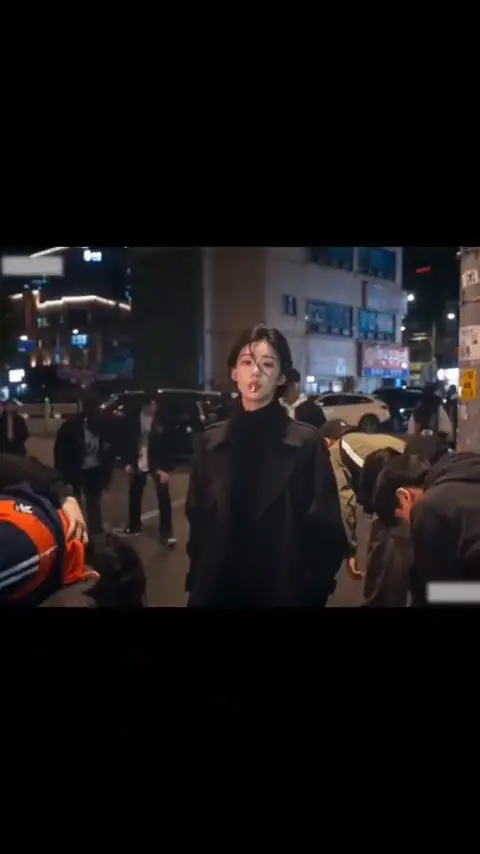
Add 1 photo for an 8-second King Jin entrance: the crowd bows, you take out the lollipop, then walk into the next scene.
Swipe ⟷
1 · TEMPLATE69 live
KING JIN AI TREND
Viral1–1 people8 s
2 · MODE1 photo · Solo performer
3 · PHOTOS(0/1 ready)
Drop your photo here
or click to browse · JPG, PNG, WebP · 10 MB
+ Choose photo
STEP 1 · UPLOADRequired
One person in frame
Clear, front-facing face
Even, natural lighting
✓ Photo tip:Front-facing, clear light, waist-up, no sunglasses.
4 · SHAPE
5 · QUALITY
8 s video · 534 credits · ~4 min render in meme video maker
● TEMPLATE PREVIEW
✦ Trending · live 2026-11-16T09:11:28.712Z
KING JIN AI TREND
Viral
Add 1 photo for an 8-second King Jin entrance: the crowd bows, you take out the lollipop, then walk into the next scene.
Example
What does the King Jin video look like?
You become the central person the crowd bows toward, then carry that same look through the candy close-up, indoor walk and rooftop finish. The surrounding people stay as background performers.
The upper and lower images in the demonstration compare separate casts of the same scene. They are two examples shown together, not two people you must upload or a split-screen layout you receive. Your finished clip shows one scene at a time. Watch how the lead stays central after each cut, especially when the camera moves from the street to the face.
Human
9:16 Vertical·Clean MP4
Ready to Remake
Upload your photo to star in this exact scene in 3 minutes.
Choose Human and upload one solo picture to replace the entrance lead throughout the montage. The crowd and scene changes are already part of the sequence, so you do not supply photographs for everyone around you.
01Step 1
Add your photo
Keep your lips, chin and hairline visible: the candy removal brings all of them close to the camera. Your uploaded picture guides the lead's appearance; review how images are handled in the privacy policy before choosing a personal photograph. Up to 40MB source photos are supported.
02Step 2
Press Generate
Choose the shape and quality, check the credit amount on the button, then generate. The sequence follows the turn toward the camera, small smile and walk from the stairs, with the clip's existing sound included. You do not have to record those actions or write instructions for each location.
03Step 3
Download or share
Preview the close-up before downloading the 8-second result. Choose 9:16 for a tall post centered on your face, or 16:9 when the surrounding crowd needs more space on either side. Both 720p and 1080p are available; the shape changes framing, not the number of photographs required.
The trend
Where did the King Jin trend start spreading?
King Jin photo tutorials were circulating on TikTok by 12 November 2026, including this entrance example from @i0159157. A separate tutorial posted by the same account that day drew about 1,400,000 views by 16 November, showing that the photo-based entrance demonstration had reached a substantial audience. These are separate posts, not successive view counts for one upload.
Earliest dated post
12 November 2026
Latest dated post
14 November 2026
Platform
TikTok
Posts in the timeline
5
A tutorial from @xdwshfzqi0k posted on 13 November reached about 207,800 likes and 24,300 shares by 16 November. That response shows people were passing this particular demonstration around, rather than simply watching a scene description. Its invitation is direct: “Just upload one photo to recreate this popular template in CapCut.” The link leads to a CapCut template titled AI trend.
The next tutorial by @xiaofei949 followed on 14 November. Its multilingual caption repeats the one-photo approach and the name King Jin powerful incoming. Together, these posts explain the practical appeal of the King Jin trend: a familiar portrait can take the lead in a theatrical entrance without the person filming a performance.
The social format is the useful distinction when choosing what to make. The bowing crowd gives the arrival its exaggerated status, while the candy gesture keeps the lead casual. The later cuts carry that attitude into new surroundings instead of resolving a plot or showing a fight.
TikTok
A one-photo entrance example pairs the crowd-and-candy sequence with PSY Gentleman. See the post
TikTok
A separate tutorial from the same account shows viewers how to make the entrance with a single photo. See the post
TikTok
A CapCut tutorial invites viewers to turn a single uploaded portrait into the dramatic entrance. See the post
TikTok
Another photo-effects tutorial uses the King Jin name for the dramatic entrance. See the post
TikTok
Another tutorial repeats the photo-based format with captions in several languages. See the post
Who to cast
Who should star in your King Jin meme?
Pick someone whose ordinary personality makes the grand entrance amusing: the unassuming friend, your dressed-up self, or a person who enjoys playing the calm center of attention. Human uses one photograph in each case.
Human · Your portrait
You, trying the King Jin tutorial
The invitation from @xdwshfzqi0k makes your own portrait the obvious starting point. Try Human with 1 photo for a King Jin entrance lasting 8 seconds, then watch the street turn: your everyday face becomes the person everyone around them acknowledges. Keep the outfit visible through the close-up and as you walk forward with the rear staircase behind you.
Human · The quiet friend
The quiet friend with the small smile
Cast the friend who rarely makes an entrance but always has a dry reaction. Human needs 1 photo for the moment when an amber lollipop leaves the mouth and the little smile appears. Keep the lips and chin clear: the white candy stick crosses this area, so an exaggerated open-mouth selfie can compete with the restrained gesture.
Human · Your outfit
Your dressed-up corridor entrance
Give Human 1 photo of an outfit you enjoy wearing, with enough upper body to show its shape. The walk from the rear staircase puts that clothing under a fluorescent ceiling light, so you see the same look in a different atmosphere. Let the changing setting do the theatrical work instead of choosing an overloaded costume photograph.
The King Jin meme works through a composed face against an over-the-top welcome. It is less suited to a group-photo reveal, a pet performance or a scene where everyone needs to be recognizable: this version changes only the central human lead. Choose another format if replacing the background cast is essential to your joke.
Why here
Why make your King Jin entrance here?
One upload guides the same lead through all four shots, while the timing and camera changes are already arranged. You can concentrate on the person and outfit instead of assembling the entrance beat by beat.
Photo to entrance
Take the King Jin template route without an editing app
The tutorial from @xdwshfzqi0k introduces the King Jin CapCut template as a photo-based remake. Human takes 1 photo and creates an entrance lasting 8 seconds, so there is no separate editing-app timeline to arrange before the candy gesture and indoor walk can follow each other.
Scene timing
Keep the crowd bow and the candy close-up together
The bowing onlookers establish who commands the scene; the amber lollipop close-up then reveals the lead's unhurried reaction. Fingers pinch the white candy stick before the small smile, keeping the gesture legible rather than reducing it to a still pose. That contrast between everyone else's effort and your small movement makes the entrance read.
Your appearance
Carry your own outfit through the corridor
Show the clothes and hairstyle you want to wear across the cuts. If you want the example’s black long coat, black turtleneck or loose dark strands, include those features in your photo; otherwise choose a picture that clearly shows your own look. Keep the garment and hair visible through the crop.
Framing choice
Give the bowing onlookers room in a wide frame
A tall composition makes the lead's face the priority; a wide composition gives the bowing onlookers more room. Parked cars provide depth behind the crowd, while illuminated storefronts help establish the night setting. Human offers both shapes for the same King Jin montage; choose how much of that surrounding reaction you want to emphasize.
Copy and paste
Can I read the King Jin prompt before generating?
Yes: the public King Jin prompt describes the lead, scene changes and candy action in plain language. You do not need to paste it into the generator; it is here so you can understand the intended sequence before spending credits.
Show full detailsShow less
Human
1 photo · 8 s · 720p · 9:16 · 534 credits
Video prompt
Build an 8-second character montage across a busy night street, blue corridor walls and a daylight rooftop. Keep the bowing onlookers and parked cars in the opening street view, and the white candy stick in the street close-up.

The central lead is the person in [Image 1] throughout. Their face, hair, complexion, clothes and accessories come from that photo; the other people remain supporting background figures. Show a single scene at a time.

00:00–00:02.55: medium street view; you turn toward the lens while the crowd bends forward on either side and the lollipop rests at your lips. 00:02.55–00:04.75: cut closer; lift one hand, hold the stick, remove the candy from your mouth and give a restrained smile. 00:04.75–00:07.05: cut indoors; glance sideways near the rear staircase, approach the camera and look toward the right side. 00:07.05–00:07.65: cut to a bright rooftop close-up, facing the lens with two figures behind you; let this pose close the clip.

Exclude the source actor's black long coat, black turtleneck and loose dark strands unless your photo contains them. Keep the candy mouth-sized, the fingers separate and the same person recognizable after every cut. Fill the chosen frame without a comparison split or black borders, with no text, logos or watermarks.
Credits
How many credits does a King Jin video cost?
One 8-second Human video costs 534 credits at 720p or 800 credits at 1080p, with the amount shown before you generate. Each purchase of a render covers the complete entrance montage, rather than charging for the street and corridor separately.
Credits by version
4 Rows
Version
Settings
Credits
Human
8 s, 720p, 9:16
534
Human
8 s, 720p, 16:9
534
Human
8 s, 1080p, 9:16
800
Human
8 s, 1080p, 16:9
800
← Swipe horizontally to view full parameters →
The dearest version here is 800 credits, and the smallest one-time pack that covers it is $9.90 for 1,500 credits. Credits are bought once and do not expire. See pricing and credit packs.
Choose the quality you intend to share and check your balance before starting. A failed generation returns credits under the refund policy; that is different from a finished clip whose expression or clothing you would prefer to try again. The pricing page lists the available credit options.
Second by second
What happens in the King Jin video, second by second?
The scene moves from a public welcome to a close reaction, then follows the same lead into an interior and an outdoor finish. Your photograph replaces that lead throughout; the timeline shows what the camera and body do in each part.
Show full detailsShow less
Second by second
4 Rows
Time
What happens
Human
0 to 2.55 s
Night street medium shot with parked cars, illuminated storefronts and bowing onlookers.
You turn from a side glance to face the camera, keeping the lollipop at your lips while the people beside you bend forward.
2.55 to 4.75 s
Hard cut to a street close-up; the background pedestrians remain behind your shoulders.
You raise your hand, pinch the white candy stick, draw the lollipop out of your mouth and finish with a small smile.
4.75 to 7.05 s
Hard cut to a blue stairwell corridor with glass doors, wood-framed windows and overhead fluorescent lighting.
You glance sideways, walk forward from the stairs and turn your gaze toward the right edge of the frame.
7.05 to 7.65 s
Hard cut to a daylight rooftop close-up with distant towers and two background figures.
You face the camera with a composed expression, keeping the same photo identity for the final shot.
← Swipe horizontally to view full parameters →
The finished Human clip is 8 seconds, in your chosen tall or wide shape, with sound from the template. Timing and small facial movements can vary between generations. Check the change into the corridor as well as the first close-up: the person should still look like your photograph after the lighting and distance change.
Troubleshooting
How do I fix an awkward King Jin result?
Match the problem to the frame where it appears: clothing needs a clearer outfit photo, while the candy close-up needs an unobstructed mouth and chin. The table separates those issues so you can change the part of the upload that matters.
Problems and fixes
5 Rows
Problem
Fix
The source coat appears on your replacement
The black long coat occupies much of the reference silhouette and can compete with clothing in a tightly cropped input. Choose a photo that clearly shows your intended shoulders and outfit, then try again.
The source hairstyle leaks into the close-up
Loose dark strands cross the source face, while a dim or obstructed photo gives less detail for your own hairline. Replace the input with a well-lit photo showing your hairline and both sides of your face.
Your face becomes less distinct in the corridor
The rear staircase shot places the subject farther from the camera than the candy close-up. Try a sharper single-person photo with a large unobstructed face and inspect the corridor section before sharing.
The candy stick bends or intersects your fingers
The small white candy stick crosses the lips and hand during a close-up contact action. Use a photo with the mouth and chin unobstructed, then rerun and compare the candy-removal moment.
Your uploaded photo is rejected
The source photo may not meet the supported file or content requirements. Choose another eligible photo and check the credit-return conditions in the [refund policy](refund policy) before retrying.
← Swipe horizontally to view full parameters →
Posting
Which sound and hashtags suit a King Jin post?
The tutorials use more than one sound, so King Jin is recognizable through its entrance sequence as well as its soundtrack. Your generated clip includes the template's audio; preview it before adding another track over it.
Sound
The later tutorials link ((KIAT JUD DAY HARDTEKK (TikTok Version) - hardangel|https: www.tiktok.com/music/KIAT-JUD-DAY-HARDTEKK-TikTok-Version-7694495662550059060)). That sound page had 6,650 videos by 16 November, a total covering every use of the track, including unrelated clips. The earlier entrance example uses PSY Gentleman - Haciman. Choose the sound that fits your edit rather than treating either label as proof of where the original scene came from.
Hashtags
#KingJinAITrend is used in the tutorial captions alongside CapCut tags. A short caption can focus on the joke—your usually quiet arrival getting an absurd welcome—without retelling every shot. Keep the platform's AI label, and use your own photograph or one the person has agreed you may use.
FAQ
What else should I know about the King Jin trend?
What is the King Jin AI trend?
It is a dramatic entrance montage with a crowd bow, a candy close-up, an indoor walk and a rooftop ending. Human turns one photograph into the central person across those cuts, producing an 8-second video.
Where did the King Jin trend start?
It circulated through photo-template tutorials on TikTok, including posts dated 12, 13 and 14 November 2026 linked above. Those examples document the format's spread; the first person to create it and the original screen production have not been established.
How do I make the King Jin AI video with my photo?
Choose Human, upload a solo picture with your face and outfit visible, pick the frame shape and quality, then check the price and generate. You do not need to perform the walk or bring a candy prop into your photo.
Is there a King Jin prompt?
Yes. The public prompt above describes the four shots and the movement between them. The generator supplies its own instructions automatically, so reading the prompt is optional; use it to understand the intended result rather than as another required input.
Do I need the King Jin CapCut template?
No. The King Jin CapCut template appears in the linked TikTok tutorial, but Human makes the entrance from your photo through this generator. You do not have to transfer the result between editors to assemble the four shots.
Is the King Jin video real?
Your remake is AI-generated. The crowd's reaction and scene changes do not document your actual arrival somewhere. Describe it as an AI edit when posting, particularly if you cast someone whose viewers might mistake the montage for a real event.
Why does the demo show two people at once?
It compares two separate versions above and below each other. You upload only one photograph for Human, and your output uses a single scene at a time. The comparison lets you see how a different cast changes the same entrance.
Does my outfit change when the scene cuts?
Your outfit should come from the uploaded photo throughout. Include the shoulders and upper body so its shape is clear, then inspect the indoor shot after generation. If clothing from the example reappears, try a picture that shows more of your own garment.
Can I replace the people bowing around me?
No. Human replaces the central lead only. The crowd remains background cast and does not accept additional photos, even though several people appear on screen. A group portrait will not assign a different uploaded face to each bystander.
Why does the lollipop look strange near my mouth?
The gesture brings lips, fingers and a small stick into the same close-up, which can produce awkward overlaps. Try a sharper photo without anything covering your lower face, then review the candy-removal moment before sharing a new version.
Should I choose a tall or wide King Jin clip?
Choose 9:16 to emphasize the lead in a phone feed, or 16:9 to give the surrounding crowd more horizontal room. Both keep the same four-shot story. The upper-and-lower demonstration is a comparison, not a third output shape.
How are my photo and a failed render handled?
The privacy policy explains image handling, and the refund policy explains credit returns for failed generations. Read them before uploading a sensitive photograph or deciding whether to retry a completed result with a different outfit.