AI trend · September 2026

Ceiling fan outfit change ai: Your four-look fan transition

Since September 2026, the ceiling fan outfit change AI trend shows a wooden blade sweeping across a person on an ornate rug to reveal each outfit. Upload four photos for a 13-second 9:16 clip in 2–5 minutes.

Human maps four photos to four looks with template audio in a 13-second 9:16 clip.

Also called AI ceiling fan trend · ceiling fan transition

CEILING FAN OUTFIT CHANGE AI
VIRAL RIG
4 Photos13s HD

CEILING FAN OUTFIT CHANGE AI

Upload four photos and get a 13-second ceiling-fan outfit change with four blade-timed looks in 9:16.

Swipe ⟷
Example

What does the ceiling fan outfit change video look like?

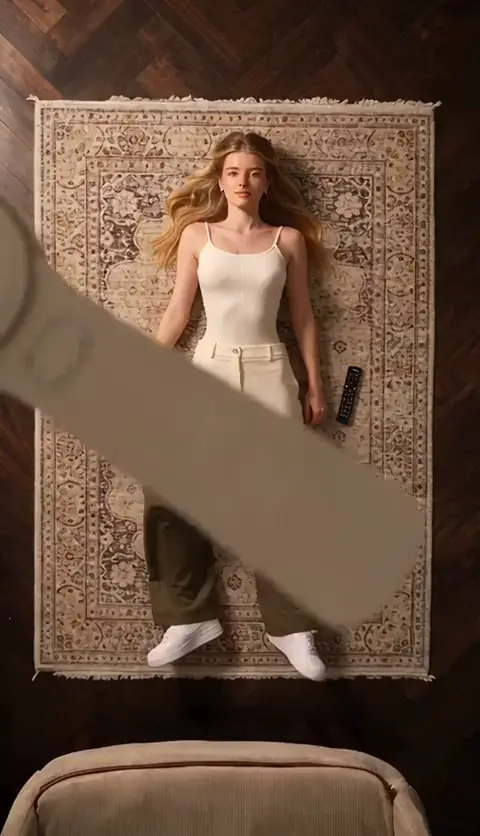
The Editorial demo stays directly above one performer on an ornate Persian rug. The ceiling fan outfit change template uses this Human version. The ceiling fan outfit change trend and ceiling fan outfit change meme describe the same blade-wipe idea, while the ceiling fan outfit change prompt stays readable when the subject, room and blade timing remain fixed. A wooden ceiling fan turns between the lens and the subject, and each broad blade pass hides a clothing change. Four successive outfit states appear under the same wooden fan.

The dark herringbone floor, cream sofa edge and black remote controls stay in place, so the joke reads as one impossible fashion take rather than four unrelated clips.

Human
9:16 Vertical·Clean MP4
Ready to Remake

Upload your photo to star in this exact scene in 3 minutes.

Remake ↑
Step by step

How do you make the ceiling fan outfit change video with your photo?

Add four permitted photos in order. The four uploaded images map to the four successive looks. The first photo starts the overhead take, and each later photo supplies the next visible look when the fan blade crosses the frame. The browser flow keeps the room, camera height and transition timing attached to the reference.

  1. 01Step 1

    Add your photo

    Use four clear full-body or three-quarter photos with the face or subject visible. The opening look shows the whole body on the rug, and the face stays readable between blade passes, so tight face-only crops lose the visual joke. Read the privacy policy before uploading.

  2. 02Step 2

    Press Generate

    The button shows the current price before you submit. The Human version preserves the top-down camera, the rug, wooden fan, remote controls, sofa edge and blade-wipe timing while the four photos control the successive appearances. Template audio remains attached to the run.

  3. 03Step 3

    Download or share

    The result is a 13-second 9:16 MP4 with template audio and 720p or 1080p output. Download it for a fashion reel or share it after checking that every person or pet shown has permission to appear.

The trend

Where did the ceiling fan outfit change trend start?

The Tab published its explainer on 28 September 2026 and described the AI ceiling fan format as having gone viral on TikTok that week. Its description matches the reference logic: a person lies below a wooden fan, and every blade pass reveals a different outfit. Read the The Tab explainer for the dated context and the embedded TikTok example.

Earliest dated post
28 September 2026
Platform
TikTok
Posts in the timeline
1

The same article records the manual route. Creators can tape a phone above the fan, repeat the overhead take in different outfits, then cut where the blade covers the frame, with CapCut as one editing option. The article does not verify a single originator, sound usage total, or the earliest AI post, so those details stay open here.

  1. TikTok

    The Tab embeds the ceiling fan example with Duran Duran’s “Girls on Film” sound. See the post

Who to cast

Who do people cast in the ceiling fan outfit change meme?

The Human setup is flexible about who appears, but every version needs one readable subject centered on the rug. The visual payoff is the same face returning after each blade pass in a new look. The prompt stays readable when the subject, room and blade timing remain fixed.

  • Human · 4 photos

    Ceiling fan four-look wardrobe relay

    The Human version takes 4 photos. A person can turn the white opening look, olive utility layer, cream knit look and burgundy tracksuit finish into a planned wardrobe relay. Use full-body or three-quarter photos with the face visible so the subject stays readable on the rug while the fan crosses the foreground at 1.55, 4.70 and 9.45 seconds.

  • Human · four-look sequence

    Ceiling fan friend pose under the rug

    A fashion-minded friend or partner makes the locked room feel deliberately over-produced. Put the most expressive pose in the fourth photo so the burgundy tracksuit gets a clear final hold at 9.45–13.07 seconds. Similar camera distance, visible hair and a centered body help the 4 blade reveals read as one person on the rug in a 13-second take. This ceiling fan transition suits the final pose.

  • Human · natural-anatomy option

    Ceiling fan pet costume reveal

    A permitted pet or illustrated character can take the 4 appearance positions when its species, markings and body proportions remain clear. Use whole-body images with visible eyes, ears and feet under the fan on a patterned rug. The 13-second 9:16 wipe can reveal a burgundy tracksuit costume at the later blade passes, but the subject keeps natural paws or limbs rather than gaining human hands. @charlottelaverickx appears in The Tab’s 28 September 2026 example.

This version is a poor fit for crowded group photos, unrelated people in the four images, or tight crops that remove the body. The reference joke depends on one centered subject and a visible change after each blade pass.

Why here

Why make the ceiling fan outfit change video here?

The reference gives the format a defined camera, room and four-beat clothing story. The same performer stays centered while the clothing changes. You can inspect the blade timing, map four photos to four looks, and see which identity details need a clean upload before generating.

  • Reference fidelity

    Four ceiling fan blade passes keep the outfit story readable

    The reference keeps one centered overhead performer, an ornate Persian rug, a wooden ceiling fan and 4 ordered clothing states across a 13-second take. The 0.00–1.55 opening and 9.45–13.07 final hold make every change read as the same person under the same camera. This is the ceiling fan transition alias.

  • Photo mapping

    Ceiling fan photos map to four visible looks

    The Human version assigns 4 appearance photos to the white, olive, cream and burgundy beats at 0, 1.55, 4.70 and 9.45 seconds. The dark herringbone floor and fan stay fixed in the 13-second take, so a swapped upload is easy to spot and repair. This is the ceiling fan transition alias.

  • Recognizable route

    The ceiling fan blade hides the risky cut

    Each clothing handoff happens while a broad wooden fan blade crosses the foreground. The wipe gives the transition a clear visual cover while the ornate Persian rug, sofa edge and remote controls keep the room continuous in a 9:16 frame across 4 handoffs. The ceiling fan transition name describes the same cut at each handoff from 0.00 to 13.07 seconds.

  • Repair path

    The ceiling fan manual route is clear when you want it

    The Tab describes repeating the overhead take and cutting on the blade sweep on 28 September 2026. This AI route keeps the fan, rug and 4-look timing attached to the reference, while the 13-second 9:16 output removes the need to assemble those cuts by hand. The Tab example links @charlottelaverickx.

Copy and paste

The ceiling fan outfit change prompts

The public prompt below shows the four fan-blade beats in plain language. You do not need to write it for the one-tap flow. It is public so you can understand the rug, fan, room continuity and photo order before you generate.

Show full details

Human

4 photos · 13 s · 720p · 9:16 · 867 credits

Video prompt

A locked top-down fashion transition on an ornate Persian rug under a wooden ceiling fan, with warm indoor lighting, dark herringbone floor, a cream sofa edge and black remote controls visible around the frame. The same performer appears throughout, using [Image 1], [Image 2], [Image 3] and [Image 4] as identity references for four successive looks. Keep the face, hair, skin tone and body proportions consistent, while each image supplies the clothing for its own reveal. 00:00–00:01.55: the performer lies centered and still in the first look as the fan turns overhead. 00:01.55–00:04.70: a broad blade sweeps across the view and clears to reveal the second look, with the body in the same place. 00:04.70–00:09.45: another blade pass reveals the third look and a small hand-to-hair gesture. 00:09.45–00:13.07: the final blade pass reveals the fourth look, followed by a calm full-body pose until the clip ends. Keep the rug, camera height, fan motion and room layout steady. Do not copy the original performer’s face, blonde hair, makeup, white sleeveless top, olive jacket, cream sweater, burgundy tracksuit, jewelry or shoes unless they appear in the supplied images, and add no text, logos or watermarks.
Credits

How many credits does the ceiling fan outfit change video cost?

The Human version uses four photos and a 13-second output. The exact 720p and 1080p amounts appear in the table before you submit, and a failed render follows the refund policy.

Credits by version
2 Rows
VersionSettingsCredits
Human13 s, 720p, 9:16867
Human13 s, 1080p, 9:161,300
← Swipe horizontally to view full parameters →

The dearest version here is 1,300 credits, and the smallest one-time pack that covers it is $9.90 for 1,500 credits. Credits are bought once and do not expire. See pricing and credit packs.

Second by second

What happens in the ceiling fan outfit change video, second by second?

The reference is one continuous overhead setup. The rug, fan, room edges, blade movement and four outfit states come from the reference, while your four photos replace the visible subject appearance in order. The last blade wipe reveals the burgundy look before the 13.07-second cutoff.

Show full details
Second by second
4 Rows
TimeWhat happensHuman
0 to 1.55 sLocked top-down view of the centered performer on the rug while a ceiling-fan blade crosses the foreground.You lie still in the opening light outfit and make a small relaxed pose under the fan.
1.55 to 4.7 sThe same overhead framing holds as a blade wipe reveals the olive utility jacket and dark cargo trousers.You remain in the same place and shift one arm and one leg into the second look.
4.7 to 9.45 sAnother blade pass reveals the cream knit sweater with tan trousers while the rug, remotes and sofa edge stay fixed.You keep looking up and make a modest hand-to-hair pose in the third look.
9.45 to 13.07 sThe final blade sweep reveals the burgundy tracksuit, then the camera holds the full overhead pose to the cutoff.You settle into the fourth look, touch your hair once, and finish calmly beneath the turning fan.
← Swipe horizontally to view full parameters →

The finished file is 13 seconds in 9:16 with template audio. Small details can vary between generations, so check the face, outfit order, hands and final burgundy hold before posting.

Troubleshooting

What goes wrong with the ceiling fan outfit change video, and how do you fix it?

The demanding moments are the small full-body view between blade passes and the fast handoff from one look to the next. The last blade wipe reveals the burgundy look before the 13.07-second cutoff. Replace the affected full-body photo and rerun the Human version when identity or timing drifts.

Problems and fixes
5 Rows
ProblemFix
The face or hair changes between blade passesThe identity photos do not show a clear face consistently. Use four clear photos of the same person with the face and hair visible; run the Human version again.
The room or rug drifts between looksThe framing is too wide or the subject is off center in the photos. Use full-body photos with the person centered and keep the camera-facing pose similar.
The fan hides too much of the body at a changeThe source photos are cropped at the shoulders or the subject is too close to the frame edge. Replace them with full-body or three-quarter photos that leave space around the head, hands and feet.
The four looks merge into one outfitThe uploaded photos have nearly identical colors and silhouettes. Choose four photos with visibly different clothing while keeping the same person and camera-facing angle.
A photo is rejected before generationThe file may be unsupported, too large, or missing a usable face. Choose another permitted image and retry; failed renders follow the refund terms at refund policy.
← Swipe horizontally to view full parameters →
Posting

Which sound and hashtags go with the ceiling fan outfit change video?

The reference uses template audio, and The Tab’s embedded example links Duran Duran’s “Girls on Film” as one sound choice. There is no verified usage total for that sound in this run, so the post can keep the supplied audio or use a platform-licensed sound at upload time.

Hashtags

The Tab example links #ceilingfan, #ceilingfantrend and #outfittransition. Keep the platform’s AI label when required, and use only your own photos, permitted people, or your own pet.

FAQ

Ceiling fan outfit change trend questions

What is the ceiling fan outfit change AI trend?

It is a top-down fashion clip where a wooden fan blade sweeps across someone lying on a rug and the next pass reveals a new outfit. This Human version uses four photos across a 13-second vertical take.

Where did the ceiling fan outfit change trend start?

The Tab published a dated explainer on 28 September 2026 and described the format as viral on TikTok that week. The earliest AI post and a single originator were not verified here.

How do I make this AI video with my photo?

Upload four clear photos in order, keep the face or subject visible, review the displayed price, and generate the Human version. The reference supplies the fan, rug, overhead camera, blade timing and template audio.

Is there a ceiling fan outfit change prompt?

Yes. The prompt card on this page rewrites the four time ranges and identity constraints in public language. The one-tap flow already pairs your photos with the reference, so you do not need to paste it.

Do I need the ceiling fan outfit change template or a CapCut project?

No. The reference-based flow handles the fan, room and blade timing. The Tab describes CapCut as an option for manually cutting repeated overhead takes, while this route starts from the reference and your four photos.

Can my dog or cat do this fan transition?

Yes, when four whole-body photos show the same pet clearly. Keep its species, markings, proportions and natural limb movement consistent, and do not give it human hands or anatomy.

Is this AI effect real?

It is an AI-generated effect built from a reference clip. The fan, rug and overhead room are the visual setup, while the uploaded photos control the visible subject. Keep the platform’s AI label when required.

What should each photo show for four looks?

Use one clear subject per photo with the face or animal head visible and enough body to read the overhead pose. Similar framing helps identity continuity, while visibly different clothing makes each blade reveal easy to follow.
✨Make Video With Your Photos

Make Your Ceiling Fan Outfit Change AI Video Now

Upload four photos and turn the four-blade ceiling fan sequence into your own 13-second fashion clip.

Written and maintained by MemeVideoMaker Editorial DeskPublished Last updated