AI trend

Self Hug Sketch AI Video: Feel Your Drawn Double Hug You

Self Hug Sketch AI Video turns 1 photo into an 8-second video of you receiving a hug from your own animated pencil double.

Choose Human; allow 2–5 minutes for generation.

SELF HUG SKETCH AI VIDEO
VIRAL RIG
1 Photo8s HD

SELF HUG SKETCH AI VIDEO

Turn 1 photo into an 8-second self-embrace with your animated pencil double and the original sound.

Swipe ⟷
Example

What does a Self Hug Sketch AI Video look like?

Your pencil double becomes the person offering comfort, while you remain in color. The effect is a self-portrait with an unexpected companion: another version of you, rather than a partner added to the picture.

Human
9:16 Vertical·Clean MP4
Ready to Remake

Upload your photo to star in this exact scene in 3 minutes.

Remake ↑
Second by second

How does the self hug sketch effect become an embrace?

The self hug sketch effect depends on contact between different-looking versions of the same person. These key moments show how the drawing stops reading as background decoration and starts sharing the foreground.

Reference clip · Clip time

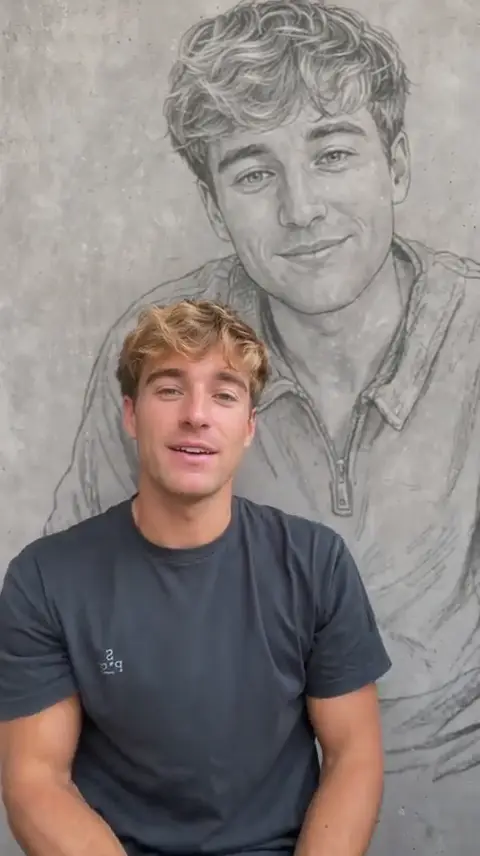
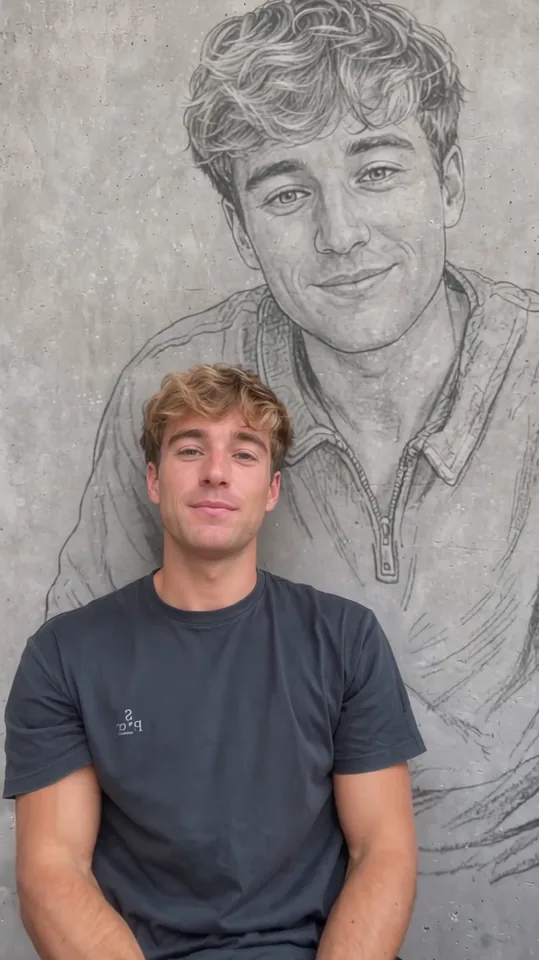
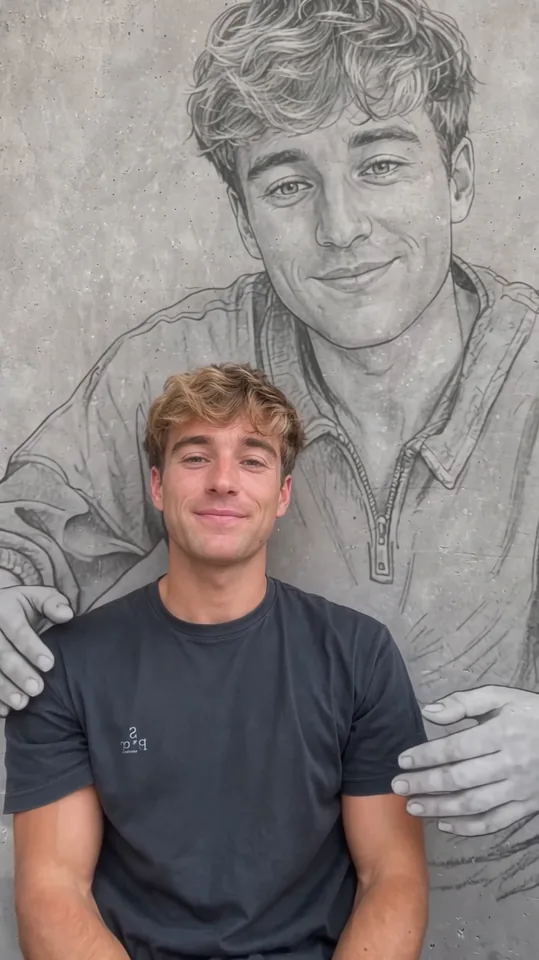
  1. A seated man in color in front of a much larger gray pencil likeness.
    Clip time 1.5 s

    One likeness, different scales

    A colored foreground person sits beneath an oversized pencil portrait. The matching appearance establishes a self-portrait, while the scale difference separates the figure from its drawn double.

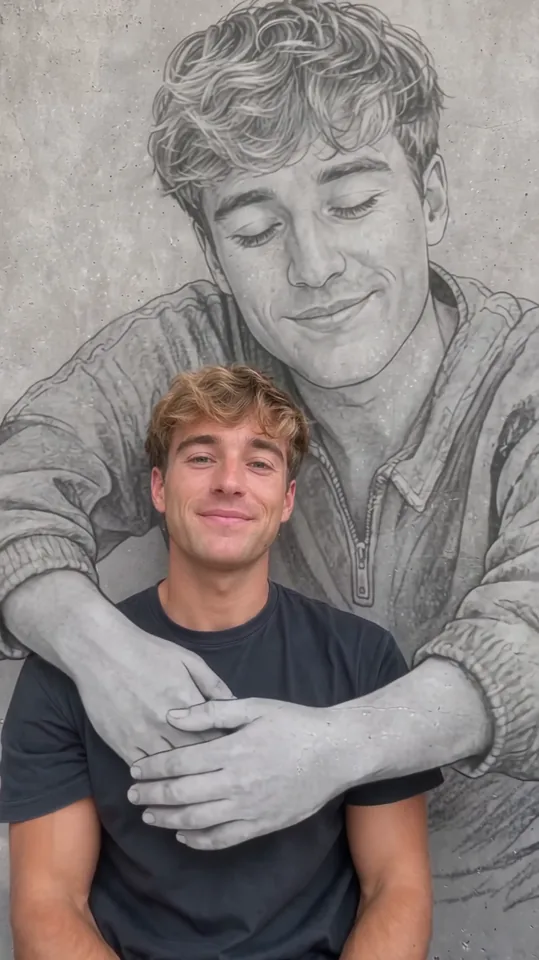
  2. Large pencil hands reach from both sides toward the seated man’s shoulders.
    Clip time 2.6 s

    Drawn hands enter the foreground

    The pencil hands reach around either shoulder while the person keeps their own arms down. This first contact makes the drawing an active participant rather than a backdrop.

  3. Gray illustrated forearms overlap in front of the man’s chest beneath a lowered drawn head.
    Clip time 3.4 s

    The sketch completes the enclosure

    Drawn forearms cross over the chest as the larger head bends closer. Their overlap places the embrace in front of the person, while the pencil texture stays visible.

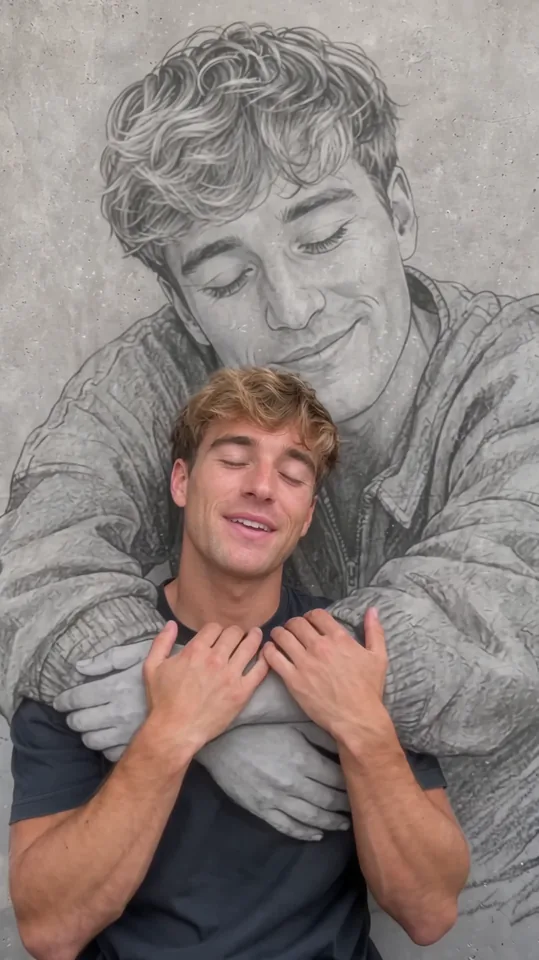
  4. The man rests both hands on the encircling pencil arms with his eyes closed.
    Clip time 4.4 s

    The person answers the hug

    Both real hands now rest on the illustrated arms, and the person closes their eyes. The response completes the exchange; the later frames hold this pose rather than showing a release.

Step by step

How do I make a Self Hug Sketch AI Video?

Add your portrait to Human, generate the scene, and save the finished self-embrace. You do not need to prepare a drawing of yourself first.

  1. 01Step 1

    Add your photo

    Choose the person you want portrayed and upload their picture. Before using a personal portrait, read how uploaded photos are handled in the privacy policy.

  2. 02Step 2

    Press Generate

    Check the charge shown on the button, then start your render. Keep the job available while it finishes rather than starting another because the portrait has not moved yet.

  3. 03Step 3

    Download or share

    Play the completed file before saving it. Attach a short personal caption if you are sending it to mark an occasion; the recipient should understand why you chose this portrait.

Who to cast

Who would enjoy a self hug sketch portrait?

Choose someone who would enjoy a tender self-portrait, rather than someone expecting a prank. The small, inward-looking gesture suits a personal message more than a group celebration.

  • Human · 1 photo

    A Human reminder to be kind to yourself

    In @coach__lea's post, the caption connects an illustrated embrace with self-love. Try Human with 1 photo when you want to acknowledge yourself without making a speech or inventing a romantic partner.

  • Human

    Your Human celebration after a hard week

    A finished exam, a difficult conversation or a small personal win can deserve acknowledgment even when nobody else saw it. Make this portrait for that private milestone, with a caption explaining what you are proud of.

  • Human

    The friend who deserves a smile back

    Think of the friend who checks on everyone else. The gentle response makes an affectionate thank-you for their encouragement, provided they want to appear; it need not become a public post.

Skip this effect when your aim is a loud punchline. Its appeal is reassurance and recognition, so a humiliating caption would pull against the gesture.

Why here

Do I need a CapCut template for self hug sketch?

No. You can make this version directly from your portrait; a CapCut template is a separate route shown in this related tutorial post.

Ways to make it
2 Rows
Way to make itWhat you needWhat you get
((Media.io's illustrated workflowhttps:
www.media.io/ai/explore/zone/self-hug-sketch-ai-video))
A prepared still combining the person and drawing, followed by an animation prompt
This generatorYour portrait and the Human optionThe arranged self-embrace scene
← Swipe horizontally to view full parameters →

Choose the composed-still route when you want to arrange the artwork yourself, or use the existing scene when you want to start with your photograph.

  • Route

    A self hug sketch route outside CapCut

    The related TikTok tutorial names a CapCut template. You do not import that template here or need to locate its editing screen to start this version.

  • Subject

    Human keeps the subject choice personal

    Human is designed for your current self. There is no childhood portrait to find and no second participant to cast, which keeps the message about self-recognition rather than meeting somebody else.

  • Composition

    Keep the embrace upright for a Story

    The tall composition leaves room above and below your face. Keep that arrangement when presenting the result as a Story; a wide crop can remove the relationship that gives the image its meaning.

Copy and paste

Which self hug sketch prompt can I read before generating?

The self hug sketch prompt below explains the requested animation in ordinary language. You can read it to understand the intended result, but you do not have to paste it anywhere to use Human.

Show full details

Human

1 photo · 8 s · 720p · 9:16 · 534 credits

Video prompt

A steady frontal view against a gray textured wall combines a colored foreground person with an oversized pencil portrait behind them. The drawing keeps its graphite shading when it reaches into the scene.

Use the person in [Image 1] for both appearances. Match their facial proportions, hair and outfit in the lifelike figure, then depict those same features as pencil marks in the larger likeness.

00:00–00:01.80: The seated person lowers an opening hand gesture and settles back under the drawing. 00:01.80–00:02.80: The illustrated hands reach toward either shoulder from behind. 00:02.80–00:03.80: The drawn forearms enclose the chest as the larger face leans downward. 00:03.80–00:04.40: The person raises both hands to rest on the encircling arms. 00:04.40–00:08.00: Keep the embrace in place, with a gentle smile and small changes of expression until the ending.

Keep the drawing larger and monochrome while the nearer person stays in color. Exclude the source actor's blond hairstyle, dark shirt, chest emblem and the drawing's zip-neck sweater unless the uploaded photo contains them. Make the contacting hands distinct, with natural fingers, and add no text, logos or watermarks.
Credits

What does a self hug sketch video cost?

The lower-resolution option costs fewer credits for the same Human scene. Each self hug sketch video is charged per generation; check the table and the button before starting, and see the refund policy for failed-generation credit refunds.

Specs and credits
2 Rows
VersionPhotosLengthFormatQualityCredits
Human18 s9:16720p534
Human18 s9:161080p800
← Swipe horizontally to view full parameters →

Changing quality changes the credit charge, not the number of scenes or people in this self hug sketch video.

The smallest one-time pack that covers the dearest version is $9.90 for 1,500 credits; credits do not expire. See pricing and credit packs.

Troubleshooting

Why can a self hug sketch face or embrace look wrong?

Likeness can drift in either depiction, and overlapping hands can become awkward. Diagnose the specific problem below before deciding whether a different portrait or another render is worth trying.

Problems and fixes
5 Rows
ProblemFix
The colored person keeps the original dark shirtThe original clothing can remain visible when the replacement photo gives little outfit detail. Try another photo that shows your face and the upper part of your chosen outfit clearly.
The drawn face resembles someone elseA large drawn likeness can retain features from the original portrait. Retry with a front-facing photo where your hairline, eyes and facial outline are easy to distinguish.
The two versions of your face do not matchA small or obstructed face gives limited detail for both appearances. Choose a photo containing only you, without sunglasses or a hand covering your face.
The hands overlap awkwardly during the embraceSeveral colored and drawn fingers meet in the same small area. Try a new render and inspect the contact area before sharing it.
The larger figure becomes another full-color personThe two appearances may lose their distinct scale or drawing style. Run the Human version again and compare the drawn figure with the sample before downloading.
← Swipe horizontally to view full parameters →

Check the realistic face, illustrated likeness and contact area separately; a convincing part does not make the whole result convincing.

FAQ

What else should I know about self hug sketch?

Is my uploaded portrait private, and how long is it kept?

Uploaded photos are normally kept for 24 hours, while finished videos remain for 30 days. Running tasks can retain inputs until completion; see the privacy policy for storage, providers and deletion details.

How is this different from a two-person AI hug?

This version portrays one subject in different forms. Vidu's hug instructions describe an image of two people or separate images of the participants, so check which relationship you want before choosing a tool.

Can I post my finished portrait on TikTok?

Yes, you can share the downloaded result. Keep the platform's AI label, describe it as an edit, and check that you may use the photograph and accompanying sound in your post.

Is the drawing really reaching out of a wall?

No. The impossible encounter is an AI visual effect, not footage of a physical drawing moving. Present it as imaginative self-expression rather than a recording of an event.

Can I add my own message beside the portrait?

Yes, add your wording afterward in an editor. Keeping lettering out of generation lets you proofread the message and place it where it does not obscure the embrace.

Can I change the original sound after downloading?

Yes, you can replace the soundtrack in an editor. Listen through the finished edit before sharing, particularly if your replacement music changes the mood of this quiet portrait.
✨Make Video With Your Photos

Make Your Self Hug Sketch AI Video Video Now

Give a personal milestone its own moment: choose your portrait and make an illustrated embrace that feels like yours.

Written and maintained by MemeVideoMaker Editorial DeskPublished Last updated