Dugun Dansi AI Video Generator: Put Friends in Wedding Dance
Use the dugun dansi ai video generator to upload 3 photos, lock in a 9:16 vertical frame, and produce a 15-second Turkish wedding hall dance clip with the original trend sound in 2–5 minutes. A 720p render costs 1,000 credits, and a 1080p render costs 1,500 credits under the site-wide per-second pricing rule.
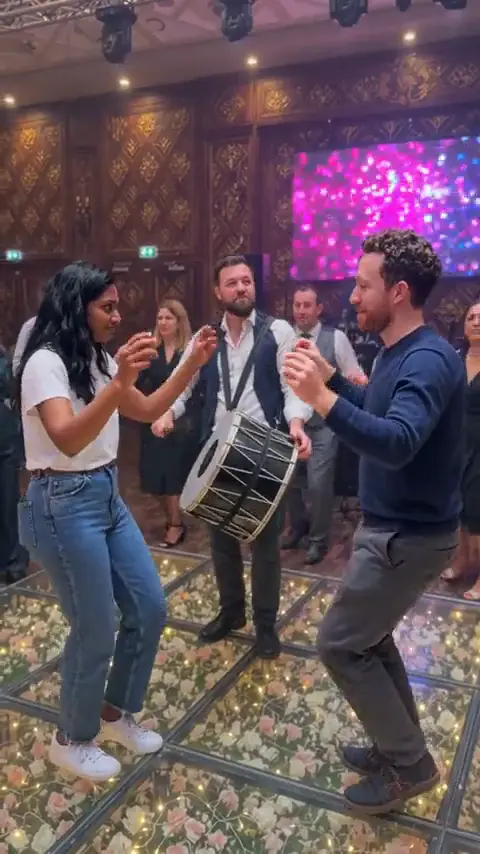
The lit floral glass dance floor, hand-holding wedding guest circle, rear drummer carrying a double-headed davul, two-person reception dance, and last-moment foreground photobomb are all pre-timed in the Dugun Dansi scene. Add three clear photos of friends, family, pets, or authorized characters instead of writing a prompt or cutting shots on a timeline.
DÜĞÜN DANSI AI
Recreate the 15-second Dugun Dansi wedding hall dance and surprise photobomb from 3 photos in 9:16 with the original sound.

Slot 1: Left Dancer (Bride)
Clear full or upper-body photo of a person, pet, or character for the left foreground spot
Slot 2: Right Dancer (Groom)
Clear full or upper-body photo of a person, pet, or character for the right foreground spot
Slot 3: Closing Photobomber
Clear front-facing face or subject photo for the last-moment foreground camera crash
15 s video · 1000 credits · ~4 min render in meme video maker
Recreate the 15-second Dugun Dansi wedding hall dance and surprise photobomb from 3 photos in 9:16 with the original sound.
What Does an Editorial Demo from the Dugun Dansi AI Video Generator Look Like?
Every preview below is an Editorial demo produced by our internal team from the wedding-hall reference direction. It shows the left and right foreground leads dancing face-to-face on a flower-filled glass floor while wedding guests hold hands in a circle and a third performer rushes the lens near the closing beat with the original trend sound intact.
Scenario 01 · Reception trio & photobomb
Two Leads Groove Before a Third Friend Crashes the Lens
Two dancers step across the glowing floral floor, clasp hands, dip into synchronized knee bounces, and turn smiling toward the camera while a rear drummer beats a davul—until a third friend sprints straight into a laughing close-up at the end. Send this Dugun Dansi scene to a wedding chat or roast the one friend who steals every spotlight. The video is an Editorial demo, not a result made from your photo.
- Left and right foreground slots share the full reception dance choreography.
- The third slot bursts into the right foreground right before the closing frame.
- The 9:16 vertical clip returns with the original wedding dance audio track.
The Editorial demo previews the fixed Dugun Dansi choreography, camera framing, and banquet-hall lighting. It does not promise an identical likeness, wardrobe match, or motion alignment for every uploaded photo.
Preview the dugun dansi template above before assigning photos to the left, right, and closing photobomb slots. Explore more AI video trends when you want another fixed scene to recreate.
What Is the Dugun Dansi Trend?
Built around festive Turkish reception dancing (düğün dansı), the dugun dansi trend pairs energetic wedding-floor choreography with social comedy across short vertical clips. Traditional Turkish celebrations mix upbeat circle dances such as halay—where guests link hands around the floor—with live davul drum beats that keep the crowd moving.
Our dedicated Dugun Dansi tool turns that reception hall moment into a three-slot video: you assign two foreground dancers plus one surprise camera crasher while the illuminated floral glass floor, wooden hall paneling, and guest circle stay fixed. Readers get the full Dugun Dansi action without writing scene prompts or slicing reception clips by hand.
Every Turkish wedding Dugun Dansi remix is meant for sharing the punchline of who you cast rather than building a blank-canvas story from scratch.
Recognizable Moves in Turkish Wedding Dugun Dansi Clips
Face-to-face wrist bounce
Both foreground dancers stand on the rose-lit glass dance floor, lift bent arms at chest level, and bounce rhythmically while the background drummer beats the strapped davul.
Hand clasp and knee dip
The two leads lock hands face-to-face, sink into a synchronized crouched shoulder bounce, and weave past each other as guests hold hands in a surrounding circle.
Forward crouch laugh
Both leads face toward the camera side-by-side, bend forward smiling with hands near their knees, and clap back upright together.
Last-moment photobomb rush
Near the closing beat of the Dugun Dansi routine, the third performer darts into a wide-grin foreground close-up right in front of the lens while the pair keeps dancing behind.
What Does the Dugun Dansi Template Include?
The dugun dansi template locks together the chandelier-lit banquet hall, floral LED dance floor, background guests and davul drummer, three-role choreography, and the trend's original sound in a fixed 15-second vertical 9:16 video. Your three uploads supply the performers' faces, bodies, outfits, or animal shapes while the scene timing stays intact. No song lyrics are reproduced on this page, and the Dugun Dansi tool claims no affiliation with original uploaders, wedding venues, artists, or social apps.
Who People Cast in the Dugun Dansi Meme?
Three upload slots turn the dugun dansi meme into an instant ensemble punchline: two foreground leads carry the reception dance while the third slot steals the ending right in front of the camera. Choosing who dances together versus who crashes the final frame is what makes the Dugun Dansi cast funny for friends and family.
Use this three-role setup whenever your joke depends on contrast between the dancing pair and the unexpected photobomber.
- 01
Put Yourself and a Partner on the Glass Floor
Place two engagement or weekend photos into the left and right Dugun Dansi slots, then cast a close friend or sibling in the closing photobomb slot for an instant reception-night skit.
- 02
Cast the Friend Who Always Crashes the Camera
Drop two serious coworkers or quiet friends into the Dugun Dansi dance pair, then load the loudest friend into Slot 3 so they rush the lens at the closing beat.
- 03
Let Pets Dance and Photobomb the Hall
All three slots in the Dugun Dansi video support dogs, cats, or other pets alongside humans—cast two dogs bouncing on the floor and a cat crashing the foreground close-up.
- 04
Authorized Avatars and Characters Join the Reception
Load authorized 3D avatars, illustrated mascots, or gaming personas into the Dugun Dansi cast when running a creator page or fan-club meme edit.
Every preview stays an Editorial demo and does not suggest an official celebrity, venue, or character partnership.
Why Choose This Dugun Dansi AI Video Generator?
This dedicated dugun dansi ai video generator bundles the ornate wedding banquet hall, rose-filled glass dance floor, three-subject choreography, and original trend sound into one repeatable task. You upload three photos and select your output resolution instead of writing long camera prompts or syncing drum beats manually.
Keep the Dugun Dansi punchline clear while swapping only the three performers.
No prompts or reference video uploads required
Skip uploading a reference clip or drafting multi-paragraph scene instructions. The Dugun Dansi banquet hall, camera framing, and photobomb cue are already wired into the template.
Exact two-lead bounce and closing photobomb
Left and right performers execute the full Dugun Dansi steps while the third subject enters right on the closing close-up beat with the trend's original sound returned.
One-time credits shown clearly before generation
A 15-second clip uses 1,000 credits at 720p or 1,500 credits at 1080p—available through one-time packs or the Starter subscription, with credits visible before you submit.
Covered by existing privacy and refund rules
Uploads and failed renders follow the current site policies without hidden terms. Read the privacy policy and refund policy.
| Workflow | What it gives you | Where it wins |
|---|---|---|
| This Dugun Dansi AI video generator | Fixed wedding hall scene, 3 dedicated role slots, 9:16 15-second clip, trend audio, and clear credit pricing | Fastest route from three photos to the Dugun Dansi trio joke |
| Manual editing | Full timeline control over keyframes, overlays, cuts, and audio tracks | Better when you want to redesign the choreography itself |
| Open-ended prompt video | Custom rooms, clothing prompts, and arbitrary camera moves | Better when you do not want the fixed Dugun Dansi wedding hall routine |
Visit pricing and credit packs for one-time credit packs and the Starter plan. Failed renders and uploaded photo handling follow the existing site-wide refund and privacy rules.
How to Make a Dugun Dansi AI Video from Three Photos
Upload three clear images into the left, right, and closing photobomb slots, select 720p or 1080p in the fixed 9:16 vertical format, and generate your 15-second clip in 2–5 minutes. The exact credit cost displays before you confirm submission.
Follow the dugun dansi template workflow below so each role maps cleanly to its spot on the dance floor.
Upload three photos by role
Fill all three slots using Up to 40MB source photos accepted by the site photo checker: put a clear full-body or mid-to-full-length photo in Slot 1 (left dancer / bride role) and Slot 2 (right dancer / groom role) so legs, arms, and posture hold up while bouncing and crouching on the glass dance floor. For Slot 3 (the last-second photobomber), use a bright front-facing portrait or chest-up shot because that performer rushes tight into the camera close-up. Keep one intended subject per image—whether a person, pet, or authorized character.
Choose 9:16 vertical quality
This scene renders exclusively in 9:16 vertical because mobile social feeds—TikTok, Instagram Reels, and YouTube Shorts—fill the tall portrait screen and keep both dancers, the floral floor, and the close-up photobomber visible together. Widescreen 16:9 framing meant for desktop players is not offered in this fixed Dugun Dansi workflow. Next, pick 720p for 1,000 credits for fast social sharing or 1080p for 1,500 credits when you want sharper hall detail.
Generate and share
Start the dugun dansi ai video generator task and wait 2–5 minutes for rendering to finish. Download the completed 15-second 9:16 clip with the original trend sound ready to post in group chats or vertical feeds.
This is a finished-video generator. It outputs a ready-to-share clip rather than editable timeline layers or a text-prompt project.
Dugun Dansi AI Video Generator Specs, Credits, and Limits
Every 15-second Dugun Dansi video outputs in fixed 9:16 vertical framing with the original trend sound included, priced at 1,000 credits for 720p or 1,500 credits for 1080p. Render wait times run 2–5 minutes, and failed jobs follow the existing site-wide refund policy.
| Specification | Delivered result |
|---|---|
| Input | 3 image slots (left dancer, right dancer, closing photobomber) |
| Runtime | 15 seconds |
| Shape | 9:16 vertical |
| Quality | 720p or 1080p |
| Sound | Original trend audio included |
| Render wait | 2–5 minutes |
| Credits | 1,000 at 720p; 1,500 at 1080p |
| Sample label | Editorial demo |
The table reflects every product contract setting enforced before generation; review pricing and credit packs for Starter plan allowances and one-time credit packs.
What Can Make the Result Fail?
What This Generator Does Not Do
- It does not automatically split one group wedding snapshot across all three performer slots.
- It does not export a 16:9 widescreen crop or swap the wedding hall for a custom written prompt.
- It does not generate an editable timeline, project layers, or a standalone karaoke lyric track.
- It does not turn an Editorial demo into official source footage or a creator endorsement.
For open-ended meme creation outside a fixed trend scene, use the meme video maker. For account rules, read the privacy policy and refund policy.
What Is an Internet Meme Video?
“Internet memes manifest in a variety of formats, including images, videos (e.g. GIFs), and other viral content.”
The same entry is Wikidata Q2927074. Credit prices on this page are MemeVideoMaker's, listed on the pricing page and in pricing.md.
Dugun Dansi AI Video Generator FAQ
Do I need three separate photos for the Dugun Dansi AI video generator?
Can pets appear in the Dugun Dansi meme video?
Can I upload characters, mascots, or avatars I have rights to use?
Does the finished clip include the original trend sound?
Why is 9:16 vertical the only shape available?
How many credits does 15 seconds use?
How long does rendering take?
What happens if the render fails?
How long are my photos kept?
More AI Video Trends
 NEW
FANTASY RUSH HOUR AI TREND
Upload one photo or a three-photo cast to recreate the Fantasy backseat sing-along in a fixed 13-second car scene.
Dance
13s · 867 crRemake→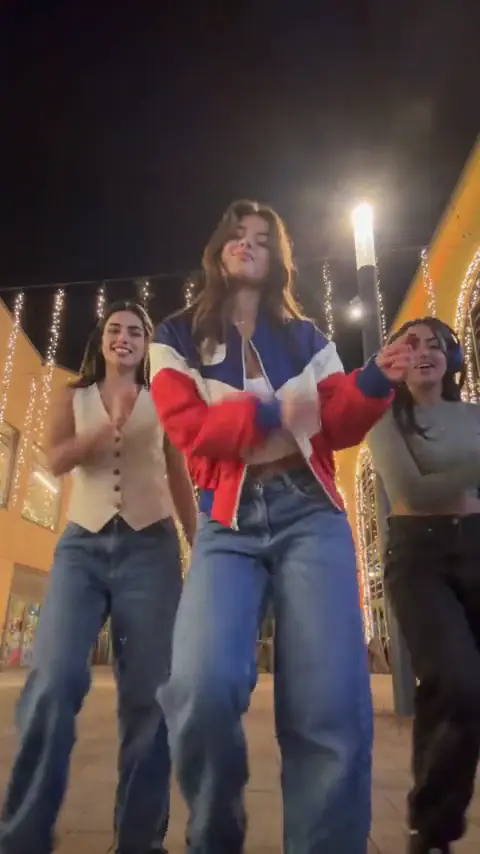 NEW
JINGLE BELL ROCK DANCE AI
Upload 1 photo and make a 4-second Jingle Bell Rock holiday lead with the supplied reference sound.
Dance
4s · 267 crRemake→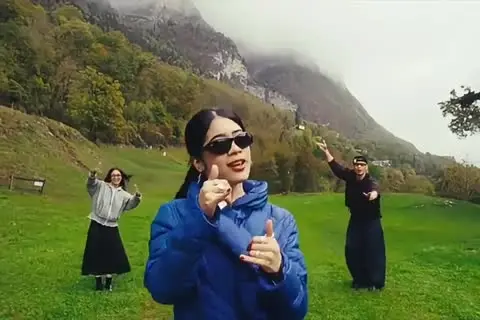 NEW
WASSUP IN A MINUTE AI
The three-person Wassup in a Minute dance from 3 photos with the original sound.
Dance
15s · 1000 crRemake→
Browse every trend you can make today in AI video trends.
Make Your Dugun Dansi AI Video Now
Use the dugun dansi ai video generator to upload 3 photos into the left, right, and photobomb slots and render your 15-second 9:16 reception clip with the original sound in 2–5 minutes.
Written and maintained by MemeVideoMaker Editorial DeskPublished Last updated