AI trend

Elevator Outfit Change AI: Four Looks, Two Door Cycles

The elevator outfit change AI trend is a fixed-camera fashion reveal: metal doors close on one person and open on a new look. Upload four full-body look photos for a 12-second 9:16 clip in 2–5 minutes.

The Human version maps four looks in order and keeps the template audio through two door cycles.

Also called elevator fitting room trend · elevator outfit change effect

ELEVATOR OUTFIT CHANGE AI
VIRAL RIG
4 Photos12s HD

ELEVATOR OUTFIT CHANGE AI

Upload four full-body look photos and get a 12-second elevator reveal where closing doors hide each outfit change.

Swipe ⟷
Example

What does the elevator outfit change video look like?

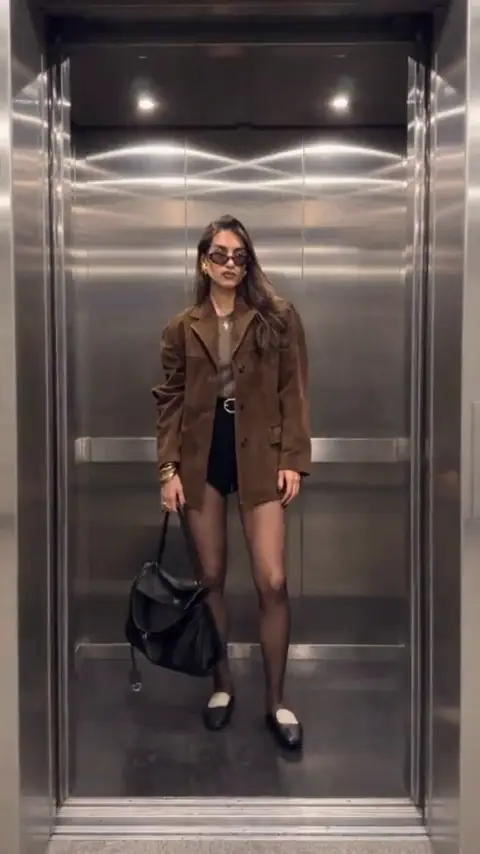
The Editorial demo stays outside a stainless steel elevator with mirrored walls, recessed ceiling lights, a polished floor, and a centered full-body performer carrying a black shoulder bag. The door panels are the edit. They close, hide the person, and open on the next look without moving the camera or changing the elevator geometry.

Human
9:16 Vertical·Clean MP4
Ready to Remake

Upload your photo to star in this exact scene in 3 minutes.

Remake ↑
Step by step

How do you make the elevator outfit change video with your photo?

Choose the Human version and place four full-body look photos in the order you want to see them. The elevator, camera, door movement, and timing stay attached to the reference while each photo supplies the visible person and requested outfit.

  1. 01Step 1

    Add your photo

    Use one clear full-body image for each look. The person remains small inside the tall elevator frame, so a sharp front-facing face matters even when the outfit needs to be visible from head to shoes. Upload only photos you are allowed to use and read the privacy policy before submitting them.

  2. 02Step 2

    Press Generate

    The button shows the current price before you submit. Your video keeps the outside camera, mirrored metal walls, floor contact, the bag, door rhythm, and template audio. Your four photos determine the identity and look order, so swapping Look 2 and Look 4 changes the story rather than the elevator.

  3. 03Step 3

    Download or share

    The output is a 12-second vertical 9:16 MP4 with template audio and 720p or 1080p quality options. Watch the two door closures before posting, then download the clip or share it as a fit-check reveal.

The trend

Where did the elevator outfit change trend start?

The earliest dated TikTok record for this format is @qmike’s entry from 17 March 2022, captioned “10 outfits change later”; the first AI post and launch month for this clip remain unverified.

Earliest dated post
17 March 2022
Latest dated post
18 April 2025
Platform
TikTok
Posts in the timeline
3

That record anchors the door-hidden outfit swap on TikTok while the supplied AI clip has no confirmed original post. The page showed 5,846 likes by 14 November. Read the Mike Quyen TikTok for that record.

On 12 April 2025, @yuki_injo captioned a post “Elevator is our fitting room 🦤🎙️💕”; it showed 316,800 likes by 14 November. That wording explains the fitting-room nickname while this elevator clip keeps the same core action: the doors close, the person disappears briefly, and the next look appears. Read the Yuki TikTok for the dated post.

An 18 April 2025 variant from @moonstoneglow6 captioned “The woman entered the elevator and was changed into a new outfit” and showed 1,831 likes by 14 November. These records support the recurring door-and-look format, while the exact origin of the AI clip remains unverified.

  1. TikTok

    A dated TikTok caption says "10 outfits change later" and frames the format as a sequence of looks. See the post

  2. TikTok

    The caption calls the elevator a fitting room, matching the door-open reveal in this reference. See the post

  3. TikTok

    A variant caption describes entering the elevator and changing into a new outfit. See the post

Who to cast

Who do people cast in the elevator outfit change meme?

The Human version is built for one person whose four looks can be read in the same elevator frame. The most satisfying cast is someone whose wardrobe order tells a small story before the last door opens.

  • Human · 4 photos

    The friend who changes before every elevator door

    The Human version uses 4 photos of one consenting person. Look 1 opens the lift at 00:00, Looks 2 and 3 arrive at 00:04.45 and 00:09.55, and Look 4 supplies the final hold from 00:10.25 to 00:12.00. Use sharp full-body photos with a clear face so the identity remains readable when the performer is small in the tall elevator.

  • Human · four-look order

    A four-look elevator wardrobe story

    A casual-to-formal sequence gives the elevator outfit change meme a beginning and payoff in the lift. The Human preset maps 4 full-body photos at 00:00, 00:04.45, 00:09.55, and 00:10.25–00:12.00. Put the least dramatic look first, reserve a strong change for Look 3, and keep the final photo easy to read beside the bag and metal door frame.

  • Human · fit-check framing

    The elevator fitting-room regular

    This works for a creator who wants a repeatable fit-check format rather than a crowded cast. @yuki_injo’s “Elevator is our fitting room” caption gives the scene a recognizable nickname. The clip lasts 12 seconds and keeps 1 person in the same lift through 2 door cycles, with the black shoulder bag visible at 00:10.3. Use one person per photo and remove sunglasses or heavy filters. The fixed elevator and repeated door reveal make the clothing sequence do the talking.

This version is a poor fit for group photos, face-only crops, or four unrelated people. The reference depends on one body returning to the same floor position after each door cycle.

Why here

Why make the elevator outfit change video here?

The reference gives the elevator outfit change video a visible edit point. You can plan four looks before uploading, then check each door opening against a known 12-second rhythm.

  • Door fidelity

    The doors hide each look change

    The 12-second 9:16 camera stays outside the lift while the closing metal doors pass from 00:02.50–00:04.45 and 00:07.55–00:09.55. That preserves the mirrored walls, polished floor, centered body scale, and the simple reveal.

  • Photo mapping

    Four elevator outfit looks map to four photos

    The Human version assigns 4 photos to Look 1 through Look 4 in order. Look 1 starts at 00:00, the middle looks appear after the door cycles, and Look 4 holds at 00:10.3–00:12.0 with centered full-body framing in the 12-second 9:16 cut.

  • Identity lock

    A full-body prompt protects the elevator geometry

    The internal prompt keeps one person centered for 12 seconds through 2 door cycles at 00:02.5 and 00:07.5, with floor contact, a black shoulder bag, and mirrored metal walls. A sharp front-facing image protects the small face inside the lift frame.

  • Reference audio

    The elevator outfit change cut keeps the door rhythm

    The 12-second 9:16 reference clip carries template audio. The closing doors pass at 00:02.50–00:04.45 and 00:07.55–00:09.55 before the dark long coat holds, so the phone-sized cut keeps the door rhythm legible.

  • Source language

    Fitting-room captions name the scene

    On 12 April 2025, @yuki_injo captioned “Elevator is our fitting room”; on 18 April 2025, @moonstoneglow6 described entering the lift and changing into a new outfit. The 12-second post and 2 door cycles give the elevator outfit change video a plain-language handle before you upload 4 looks.

Copy and paste

The elevator outfit change prompts

You do not need the prompt to use the one-tap flow. The elevator outfit change prompt is public here so you can understand how four Look photos, a fixed elevator camera, and two door closures become one continuous reveal.

Show full details

Human

4 photos · 12 s · 720p · 9:16 · 800 credits

Video prompt

One continuous elevator fashion reveal in a stainless steel elevator: mirrored metal walls, recessed ceiling lights, a polished elevator floor, and an open elevator doorway frame a full-body performer with a black shoulder bag. Keep the camera outside the lift and let the closing metal doors create the outfit changes. The person is one consistent subject across [Image 1], [Image 2], [Image 3], and [Image 4]; use those four full-body photos for the face, hair, skin tone, body shape, and personal appearance, with each Look photo supplying its requested outfit. Do not add any other person.

00:00–00:02.50: the doors stand open and Look 1 faces the camera, centered from head to shoes with the bag at one side. 00:02.50–00:04.45: both metal doors glide together until the person is hidden. 00:04.45–00:05.20: the doors part to reveal Look 2 in wide gray trousers and a new top. 00:05.20–00:07.55: that second look holds in the elevator while the head and hands make only small natural adjustments. 00:07.55–00:09.55: the doors close together again for another change. 00:09.55–00:10.25: they open on Look 3 in a dark long coat and gray trousers in the same doorway. 00:10.25–00:12.00: Look 4 supplies the final full-body appearance and stays centered beside the black shoulder bag until the end.

Keep the elevator perspective, floor contact, body scale, door rhythm, and uploaded identity coherent. Leave out the original performer’s styling unless it appears in the Look photos, and add no text, logos, watermarks, extra rooms, or extra characters.
Credits

How many credits does the elevator outfit change video cost?

The Human version costs 800 credits at 720p or 1,200 credits at 1080p for one four-photo, 12-second render. The Generate button confirms the amount before you submit, and a failed render follows the refund policy.

Credits by version
2 Rows
VersionSettingsCredits
Human12 s, 720p, 9:16800
Human12 s, 1080p, 9:161,200
← Swipe horizontally to view full parameters →

The dearest version here is 1,200 credits, and the smallest one-time pack that covers it is $9.90 for 1,500 credits. Credits are bought once and do not expire. See pricing and credit packs.

Second by second

What happens in the elevator outfit change video, second by second?

The reference is one continuous outside-the-lift shot. The elevator geometry, the bag, door panels, and template audio stay with the reference clip, while the four Look photos replace the visible person in sequence.

Show full details
Second by second
7 Rows
TimeWhat happensHuman
0 to 2.5 sLocked full-body view through an open elevator doorway, with brushed steel walls, recessed ceiling lights, and the performer centered with a black shoulder bag.You hold Look 1 in the elevator and face the camera while the bag hangs at your side.
2.5 to 4.45 sThe two metal elevator doors slide inward from both sides until the performer and interior are almost hidden.You stay in the same spot as the doors close for the first outfit change.
4.45 to 5.2 sThe doors part again to reveal the same centered full-body position in a wide gray trouser look.You appear in Look 2 and hold the reveal squarely in the doorway.
5.2 to 7.55 sThe open elevator holds on the gray trousers, pale shirt, dark jacket, black bag, and mirrored metal walls.You keep Look 2 readable with a small natural head and hand adjustment.
7.55 to 9.55 sThe metal doors make a second full closing pass, covering the elevator from the sides toward the center.You remain aligned with the doorway while the second outfit change happens behind the doors.
9.55 to 10.25 sThe doors open to a third reveal with a dark long coat and gray trousers against the stainless steel elevator.You use Look 3 for the final reveal and face the camera.
10.25 to 12 sThe final dark outfit holds in a stable full-body frame with the black shoulder bag and polished floor visible.You hold Look 4 centered until the clip ends without adding another person or location.
← Swipe horizontally to view full parameters →

The finished file is 12 seconds in 9:16 with template audio. Every generation can vary in small details, so check the face, outfit order, hands, floor contact, and final hold before posting.

Troubleshooting

What goes wrong with the elevator outfit change video, and how do you fix it?

Most problems appear when a full-body look photo is too soft or when the door-timed identity drifts. Replace the affected photo, keep the look order deliberate, and rerun the Human version when the face, outfit, or proportions change between openings.

Problems and fixes
5 Rows
ProblemFix
The original performer’s tinted sunglasses or brown tailored blazer appears on the uploaded subjectThe reference performer stays centered and those clothing details remain visible before each door transition. Replace the affected Look photo with a clear identity reference and rerun the Human version while keeping only the uploaded styling.
The outfit changes happen at the wrong door cycleThe two closing metal doors are similar transitions with short reveal holds between them. Rerun with the same four Look positions and compare the reveal order with the seven beat ranges.
The face or hands soften in the full-body elevator frameThe performer is shown from head to shoes while the doorway and polished floor remain in view. Upload a sharp, well-lit full-body Look photo and run the Human version again.
The black shoulder bag changes size or drifts between revealsThe bag hangs at the same side of the performer throughout the reference cycle. Use four Look photos of the same subject with a consistent body scale, then rerun the sequence.
A photo is rejected before the render startsThe upload may be unclear, contain multiple faces, or fail the photo checks. Upload another permitted photo and retry. If the render cannot proceed, use the refund policy at refund policy.
← Swipe horizontally to view full parameters →
Posting

Which sound and hashtags go with the elevator outfit change video?

The source posts name original sound - Mike Quyen and original sound - Yuki, while the generated clip keeps template audio. If you add a different track, use the platform’s licensed library and keep the AI label required by the platform.

Sound

The elevator fitting-room wording is visible in a dated caption, but no single verified hashtag or sound total is attached to this reference. Post the reveal as one sequence so viewers see both door closures and the final look.

FAQ

Elevator outfit change trend questions

What is the elevator outfit change AI trend?

It is a vertical video where one person stands in the same lift while the doors close and open on a new outfit. This version uses four full-body look photos and a 12-second 9:16 reference sequence.

Where did the elevator outfit change trend start?

Searchers also call this the elevator outfit change trend when they describe the door-hidden look swap. The exact AI clip’s first post is unverified. Dated records include a 17 March 2022 “10 outfits change later” post and a 12 April 2025 caption calling the elevator a fitting room.

How do I make the elevator outfit change AI video with my photo?

Upload four sharp full-body photos of one consenting person in look order, review the price shown on Generate, and run the Human version. The elevator clip supplies the camera, door timing, and template audio.

Is there an elevator outfit change prompt?

Yes. The public prompt card explains the four Look assignments, two door closures, fixed floor contact, and identity lock. The one-tap flow already runs those instructions with the reference.

How long are my uploaded photos kept?

Uploaded photos are retained for 24 hours to run the render and are deleted afterward. They are not used to train AI models. Read the privacy policy for the governing terms.

Do I need an elevator outfit change CapCut template?

No. This flow uses the elevator clip and your four photos, so you do not need a separate CapCut project to make the door reveal. Add a licensed platform sound only if you want to replace the template audio.

Will my face stay the same in every outfit?

The prompt is written to preserve one person across all four looks, but a full-body elevator shot makes the face small. Use a clear front-facing photo without sunglasses or heavy filters, then check each opening before posting.

Can I use four different people for the four looks?

No. The Human version is designed for one person returning to the same floor position. Four unrelated people make the door openings read as a cast swap instead of one continuous outfit change.

What should each look photo show?

Show one consenting person from head to shoes with even light and enough space around the body. Similar camera distance and a deliberate casual-to-formal order help the four openings feel connected.

Is the elevator outfit change video real?

It is an AI-generated fashion effect built from a reference clip. The lift and door movement come from the reference, while the uploaded photos supply the visible person and looks. Keep the platform’s AI label when required.

Can I post the elevator outfit change video on TikTok?

Yes. Export the vertical clip, keep the door closures visible, and use the platform’s licensed sound library if you replace the template audio. Only upload and portray people who have given permission.
✨Make Video With Your Photos

Make Your Elevator Outfit Change AI Video Now

Upload four look photos and turn two closing elevator doors into your own 12-second fashion reveal.

Written and maintained by MemeVideoMaker Editorial DeskPublished Last updated