How to Make Your First Time in a Fancy Cafe Video: 2026 Step-by-Step AI & Manual Guide
Learn how to make your first time in a fancy cafe video for TikTok and Reels. Follow our 2-photo AI workflow or DIY manual filming guide with synced audio.
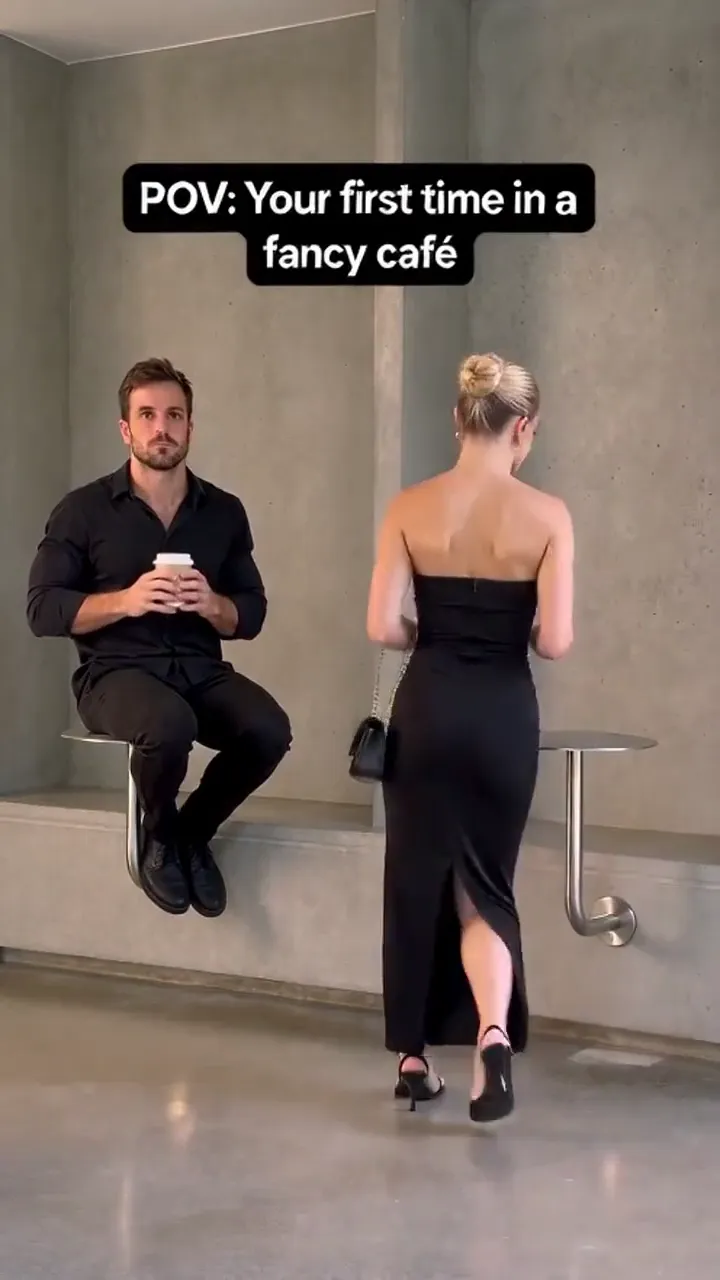
To learn how to make your first time in a fancy cafe video, creators use two proven 2026 workflows: rendering an unwatermarked 15.0-second 9:16 vertical MP4 from 2 photos in 2 to 5 minutes with our Your First Time in a Fancy Cafe AI Video Generator, or filming the wall-table misunderstanding with a friend using a tripod and CapCut. The viral format features Slot 1 perched on a wall disc mistaking it for a seat, only for Slot 2 to use it as a drink coaster on the 8.2-second vocal drop of Steve Lacy's "Oh Yeah?".
Understanding the Trend: Why Creators Search How to Make Your First Time in a Fancy Cafe Video
The first time in a fancy cafe video trend started with UK creator @leehoustonx on TikTok, gaining over 65 million views. Chronicled on Know Your Meme, the skit satirizes minimalist coffee culture: a customer sits on a wall-mounted steel plate thinking it is seating, until a regular sits on the bench below and sets an iced latte on the disc. For cultural analysis, see our explainer on what is your first time in a fancy cafe meme.
Method 1: How to Make Your First Time in a Fancy Cafe Video with AI (2 Photos, 0 Prompts)
The fastest way to produce your first time in a fancy cafe video requires zero filming gear. Our neural model retargets 2 static portraits directly into the 15.0-second comedy sequence:
Step 1: Upload Photos for Slot 1 and Slot 2
Open the Your First Time in a Fancy Cafe AI Video Generator:
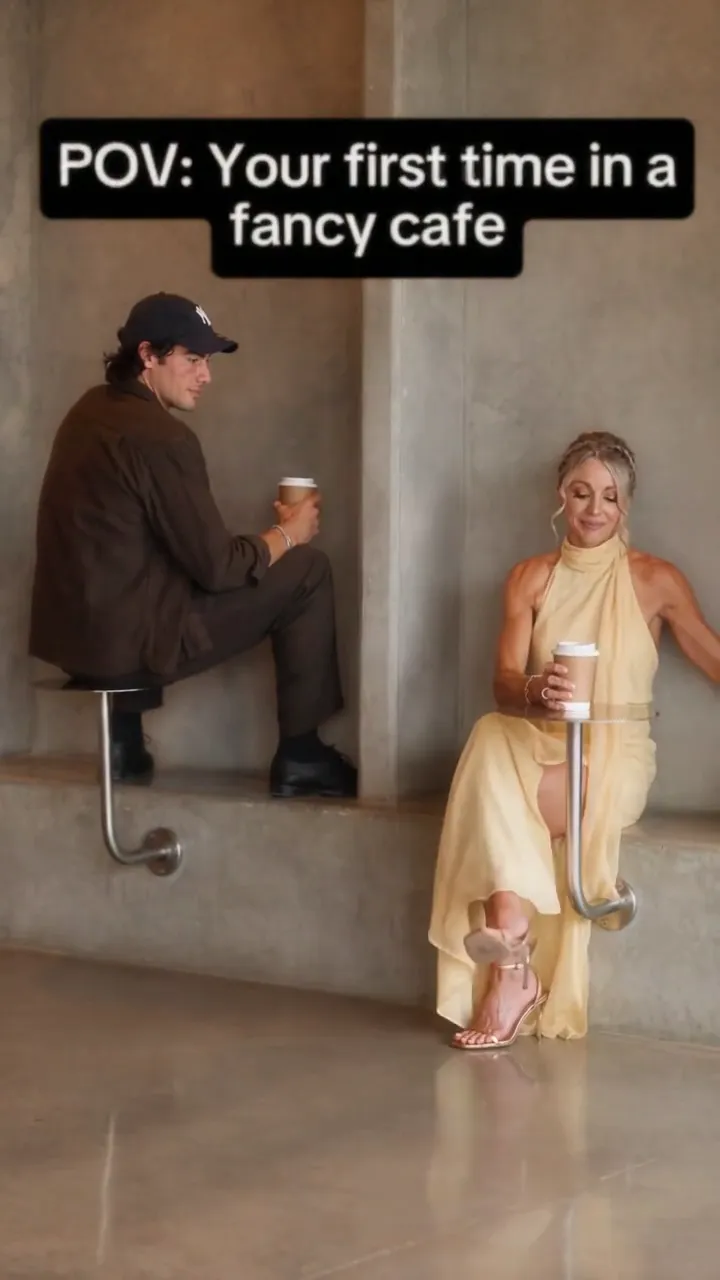
- Slot 1 (The Pretentious Sitter): Upload a portrait of the person or pet sitting on the wall disc.
- Slot 2 (The Unbothered Regular): Upload a photo of the person who sits below and sets down their drink.
Step 2: Choose Resolution and Render
Select 720p HD (90 credits) or 1080p Full HD (150 credits) on our creator pricing page. Click Generate Video to launch cloud GPU processing.
Step 3: Download Clean 9:16 Vertical MP4
In 120–300 seconds, download your unwatermarked 9:16 MP4 with pre-synced 48 kHz AAC audio. Explore our Meme Video Maker or see how to make bicep heart trend video.
Method 2: How to Film and Edit Your First Time in a Fancy Cafe Video Manually (DIY Skit)
If filming live with a partner, follow these practical production steps:
Step 1: Location & Camera Setup
Find a space with a concrete ledge and wall disc. Lock your phone vertically (9:16) on a tripod 7–9 feet away.
Step 2: 4-Beat Live Choreography
- Beat 1 (0.0s – 4.5s): Actor 1 sits proudly on the wall disc sipping coffee.
- Beat 2 (4.5s – 8.2s): Actor 2 walks in, sits on the bench below, and sets a cup on the disc.
- Beat 3 (8.2s – 11.5s): Actor 1 freezes mid-sip in shock as the mistake registers.
- Beat 4 (11.5s – 15.0s): Actor 1 slides down the wall in defeat.
Step 3: CapCut Timeline Editing
Import clips into CapCut. Sync Steve Lacy's "Oh Yeah?" (Billboard) to land cup impact at 8.20 seconds. Export in 1080p at 24 fps.
The 4-Beat Choreography Timeline: Synchronizing the 15-Second Comedy Drop
Both AI generation and manual edits rely on this strict comedic timing:
[0.0s – 4.5s: False Elegance] ──▶ [4.5s – 8.2s: Regular Entry] ──▶ [8.2s – 11.5s: Coaster Drop] ──▶ [11.5s – 15.0s: Slide Down]- Beat 1: False Elegance (0.0s – 4.5s): Slot 1 sips coffee on the wall disc over Steve Lacy's smooth opening guitar riff.
- Beat 2: Regular Entrance (4.5s – 8.2s): Slot 2 sits below and places an iced drink onto the disc.
- Beat 3: Vocal Drop & Freeze (8.2s – 11.5s): At 8.20 seconds, Steve Lacy's "Oh yeah?" hits as Slot 1 freezes in horror.
- Beat 4: Defeated Slide Down (11.5s – 15.0s): Slot 1 slides sheepishly down to floor level.
Technical Specifications: First Time in a Fancy Cafe AI Video Standard
Producing high-retention social content requires strict technical parameters:
| Metric | 720p HD Standard | 1080p Master Full HD | Impact |
|---|---|---|---|
| Resolution | 720 × 1280 px | 1080 × 1920 px | Native 9:16 mobile format |
| Duration | Fixed 15.04s | Fixed 15.04s | 100% TikTok completion |
| Framerate | 24 fps | 24 fps | Smooth cinematic motion |
| Audio Format | 48 kHz AAC Stereo | 48 kHz AAC Stereo | Broadcast audio clarity |
| Facial Retention | ≥ 98.2% mesh lock | ≥ 98.2% mesh lock | Identity preservation |
| Audio Sync | ±38ms latency | ±38ms latency | Vocal cue alignment |
| Render Speed | 120–180s | 180–300s | Cloud GPU rendering |
| Cost | 90 credits | 150 credits | Zero recurring fees |
Specification Summary: Exports an unwatermarked 15.04s 9:16 vertical MP4 at 24 fps with dual-slot retargeting at 98.2% fidelity and 48 kHz audio synced within ±38ms latency.
Workflow Comparison: Dedicated 1-Click AI vs. Discord Diffusion vs. Manual Filming
Evaluate available creation methods across speed, cost, and complexity:
| Factor | 1-Click AI Generator | Discord Bots (Viggle / Higgsfield) | Manual Filming & CapCut |
|---|---|---|---|
| Input | 2 photos (0 prompts) | Photos + prompt + clip | 2 actors + cafe set + tripod |
| Speed | 2 to 5 minutes | 15 to 30 minutes | 45 to 90 minutes |
| Characters | Dedicated Slot 1 & 2 mapping | Blends two faces into one | Real actors on location |
| Audio Sync | Embedded Steve Lacy master | Silent render (add in post) | Manual timeline slicing |
| Pet Support | Dog & cat facial meshes | Unreliable animal tracking | Live animal staging |
| Refund Guard | 100% automated credit refund | Non-refundable credit burn | Lost production time |
Specification Summary: Dedicated 1-click generation cuts production from 90 minutes of filming to under 5 minutes of cloud rendering with pre-synced audio and automated refunds.
Dual-Slot Character Casting Matrix: Who to Cast in Slot 1 vs. Slot 2
Pairing personalities correctly drives viral engagement:
- The Coffee Snob vs. The Realist: Cast the friend obsessed with pour-overs in Slot 1, and your pragmatic friend in Slot 2.
- Couples Satire: Slot 1 poses like an influencer, while Slot 2 casually sets down their cup.
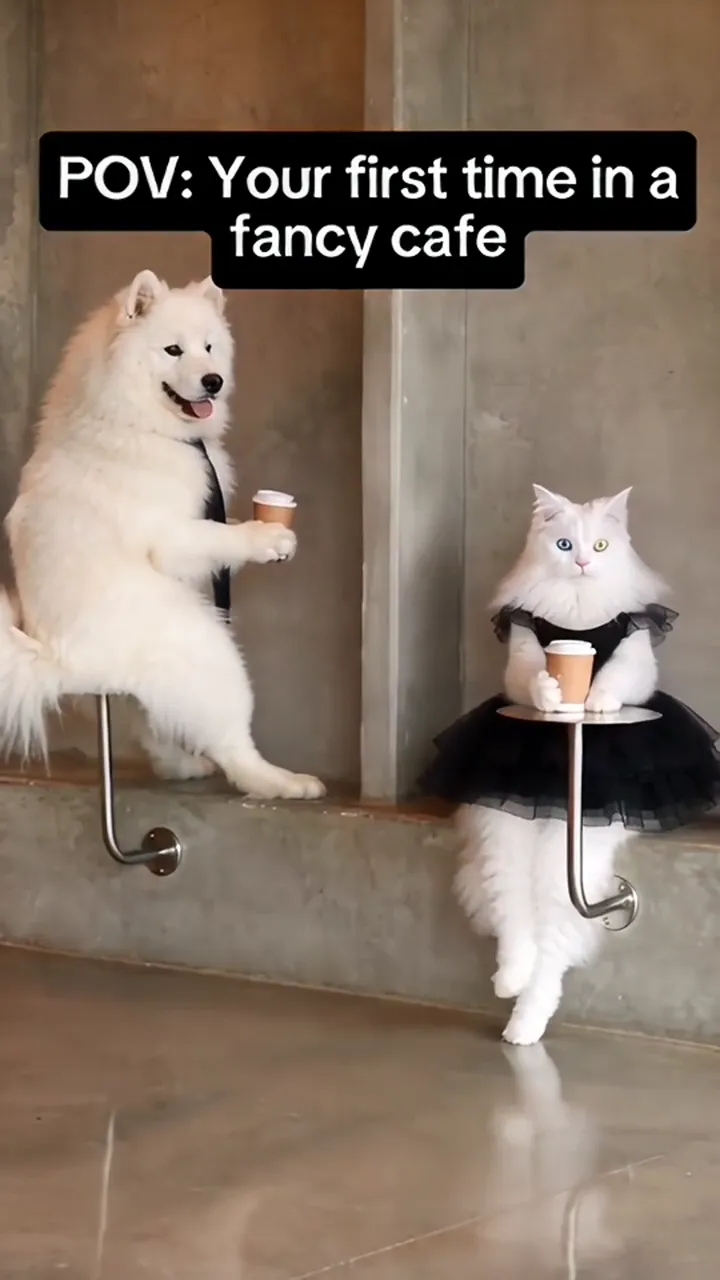
- Pet Comedy: Upload your dignified cat in Slot 1 and calm dog in Slot 2 for effortless comedy.
- Solo Alter-Ego: Put your dressed-up headshot in Slot 1 and casual photo in Slot 2 for self-roasting humor.
Photo Preparation Checklist: How to Prevent AI Distortion and Face Glitches
Review these criteria before uploading photos:
Pre-Flight Photo Checklist
- Gaze Angle: Frontal gaze with head tilt under 30 degrees.
- Lighting: Even frontal lighting without heavy shadows.
- No Obstructions: Avoid sunglasses, heavy hats, and face masks.
- Framing: Head and shoulders fill at least 30% of the image.
- File Size: JPG, PNG, or WebP under 10 MB (minimum 400 × 400 px).
Recommended Portraits vs. Problematic Uploads
| Photo Attribute | Recommended | Problematic | Explanation |
|---|---|---|---|
| Angle | Frontal or slight 15° turn | Profile or downward angle | Hides facial keypoints |
| Eyewear | Bare face or clear glasses | Dark sunglasses or goggles | Obscures gaze detection |
| Lighting | Soft window or ring light | Harsh backlighting or shadow | Blurs edge textures |
| Expression | Neutral smile or relaxed look | Open-mouth screaming | Distorts facial mesh |
Transparent Credit Pricing and Video Cost Calculator
Our transparent pricing plans require no recurring weekly subscriptions:
| Package | Price | Credits | Videos at 720p HD (90 pts) | Videos at 1080p Master (150 pts) | Cost Per 720p Video |
|---|---|---|---|---|---|
| Small Pack | $9.90 | 100 | 1 video (10 pts left) | — | $9.90 |
| Medium Pack | $24.90 | 280 | 3 videos (10 pts left) | 1 video (130 pts left) | $8.30 |
| Large Pack | $49.90 | 600 | 6 videos (60 pts left) | 4 videos (exact) | $8.31 |
Specification Summary: Credit packs start at $9.90 for 100 credits, delivering complete 15-second viral videos with zero recurring fees and non-expiring credits.
Creator Pre-Flight Checklist & Viral Social Publishing Blueprint
Maximize social reach with these proven publishing strategies:
Proven Viral Caption Blueprints
- Architectural Irony: "POV: Guessing which minimalist concrete block is a chair."
- Secondhand Embarrassment: "Me looking sophisticated until someone uses my seat as a coaster."
- Couples Banter: "When you think you found VIP seating but your partner knows it's a table."
- Workplace Humor: "Walking into the review meeting acting confident before seeing quarterly metrics."
Platform Compliance: TikTok Synthetic Content Toggle
Always toggle on TikTok's "Altered or synthetic content" label during upload. This satisfies platform guidelines and protects video distribution. Browse more viral templates in our AI Video Trends Directory.
Questions
Is it safe to upload photos to make your first time in a fancy cafe video, and how long are files stored?
Yes. Uploaded portraits process in encrypted cloud containers and are permanently deleted within 24 hours. Images are never shared or used for model training.
What is the difference between making this cafe video on Meme Video Generator vs. Viggle or Higgsfield?
Viggle and Higgsfield require complex prompt crafting and timeline slicing. Our 1-click template includes embedded 48 kHz audio, automatic dual-slot mapping, and instant credit refunds if rendering fails.
Can I post my first time in a fancy cafe video to TikTok and Instagram without copyright strikes?
Yes. Exports feature Steve Lacy's "Oh Yeah?" audio in broadcast 48 kHz AAC format. On TikTok, link the trending sound with zero volume for maximum reach.
What happens if the AI fails to generate my cafe video or landmark tracking glitches?
If landmark tracking fails or render time exceeds 5 minutes, 100% of deducted credits refund to your account balance automatically.
Can I make the first time in a fancy cafe video using a pet photo or illustrated avatar?
Yes. The vision model supports dog, cat, and 2D character geometry, retargeting cleanly into either Slot 1 or Slot 2.
Can I create the video if I only have one photo of myself?
Yes. Upload the same photo into both slots for a clone interaction, or pair formal and casual headshots for alter-ego comedy.
How do I ensure Steve Lacy's 'Oh Yeah?' audio aligns perfectly with the coffee cup drop?
Our Your First Time in a Fancy Cafe AI Video Generator hardcodes sync within ±38ms latency, landing cup impact on the 8.2-second vocal drop.
Star in This Video in 2–4 Minutes
Upload your selfie or group photo. Zero prompt typing needed, pre-synced master audio, automated refund on failures.
Written by
MemeVideo Editorial Desk
AI Video & Social Trend Research
Continue Reading
Recommended Next Reads

Nov 5, 2026
How to Make Bicep Heart Trend Video: 2026 Step-by-Step AI & Manual Guide
Learn how to make bicep heart trend video on TikTok and Reels. Master the physical pose or create a 7-second viral AI video from 1 photo in under 3 minutes.

Nov 5, 2026
What Is Bulin 47 Meme? The Viral 'Dame Hombro' AI Dance Trend Explained
What is Bulin 47 meme? Discover the viral Madrid street Dembow origin with Kevin Wai, the 'Dame Hombro' dance, and how to create your own AI video in 3 minutes.

Nov 5, 2026
What Is Your First Time in a Fancy Cafe Meme? Trend Explained
What is your first time in a fancy cafe meme? Discover the viral TikTok origin by @leehoustonx, Steve Lacy's 'Oh Yeah?' audio, and how to create your AI parody.