AI trend

GTA5 Goodbye AI Trend: Put Your Face In The Goodbye Montage

GTA5 Goodbye AI turns one adult photo into a 13-second vertical farewell montage with a generated child counterpart that follows your likeness.

Add an optional child reference for extra likeness control. Human is ready in about 2–5 minutes.

Also called GTA 5 goodbye trend · GTA 5 goodbye edit

GTA5 GOODBYE AI TREND
VIRAL RIG
1 Photo13s HD

GTA5 GOODBYE AI TREND

Make a GTA5 farewell from your adult photo.

Swipe ⟷
Example

What does a GTA 5 goodbye trend video look like?

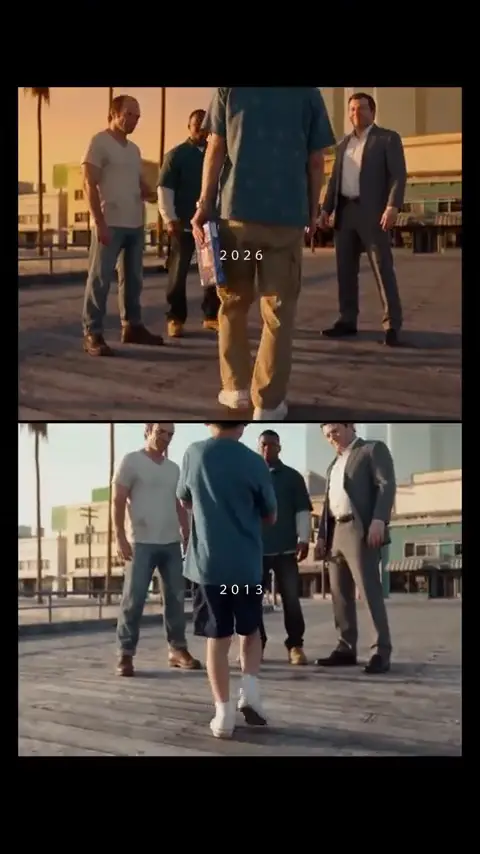
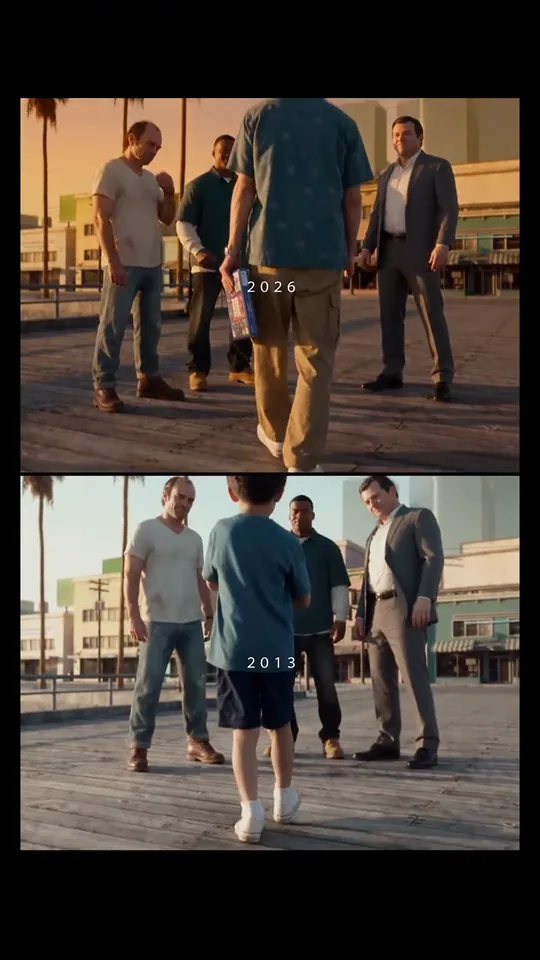
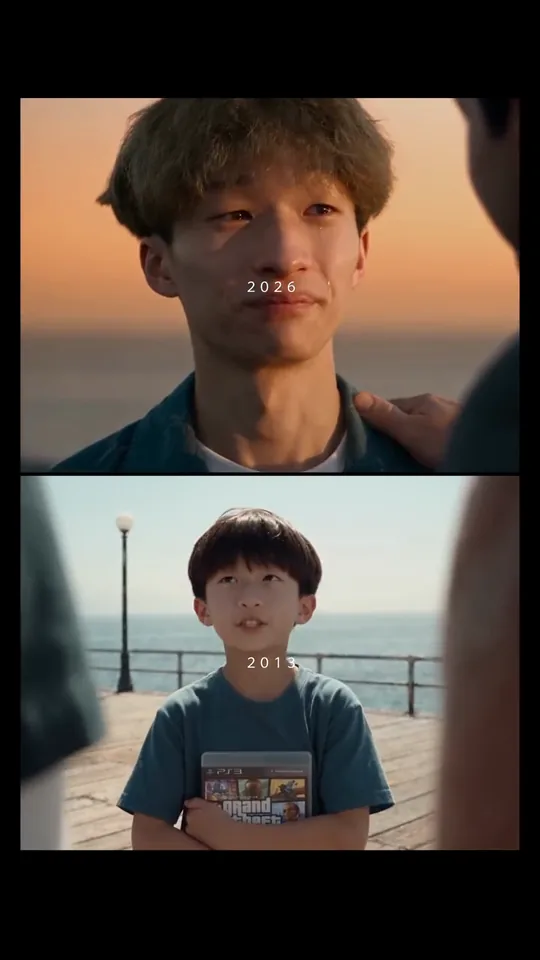
The joke is a serious adult goodbye shown above a younger counterpart. The GTA5 goodbye meme keeps one identity through the stacked panels, so a fist bump, a tight close-up, and a hand on the lower panel read as one farewell.

Human
9:16 Vertical·Clean MP4
Ready to Remake

Upload your photo to star in this exact scene in 3 minutes.

Remake ↑
Second by second

What happens in the GTA5 Goodbye video?

People also call this the gta 5 goodbye trend. The GTA5 goodbye video keeps one vertical split-screen composition while the people and gestures change at each hard cut. The six key frames below show the adult panel above the child counterpart, so you can check the action before generating.

Reference clip · Clip time

  1. Upper and lower panels show an adult and a child walking toward the camera beside several bystanders.
    Clip time 1.1 s

    The paired walk

    The upper adult panel and lower child panel move toward the camera through a small group, establishing the two-age farewell format.

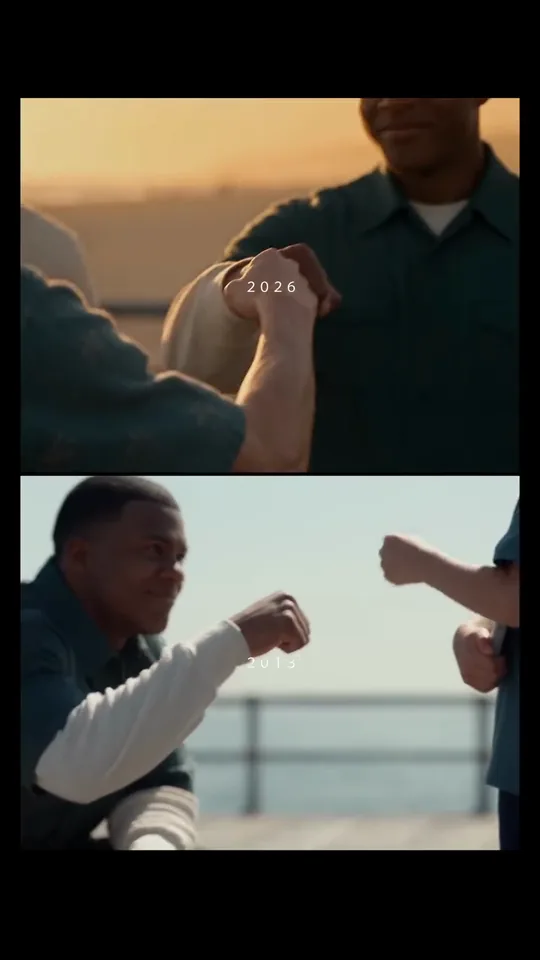
  2. A fist meets another hand in the upper panel while the lower panel shows the child counterpart reaching forward.
    Clip time 2.9 s

    A mirrored greeting

    Two fists meet in the upper waterfront panel while the lower child panel repeats the same greeting as a visual echo.

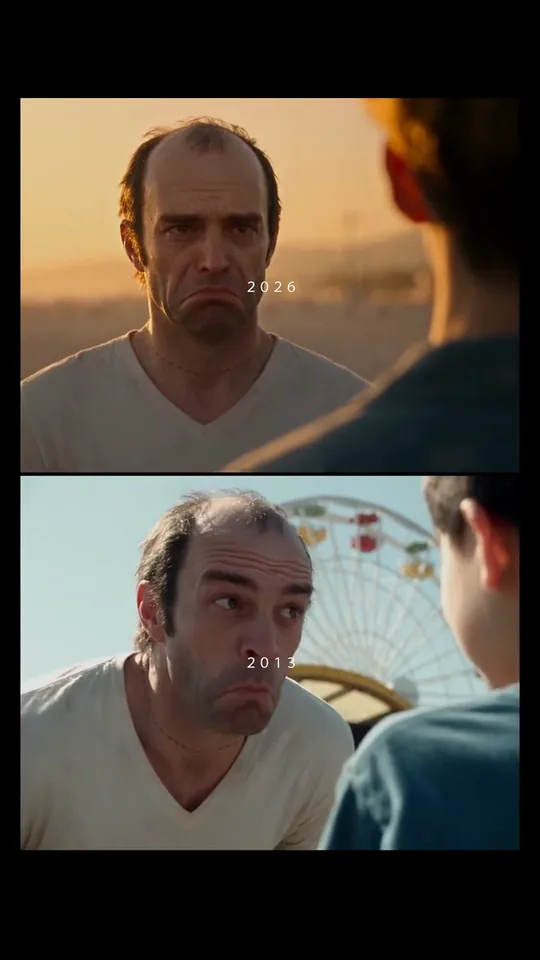
  3. A white-haired adult faces someone at the edge of the upper panel while a child looks upward below.
    Clip time 4.5 s

    The close reaction

    A white-haired adult fills the upper close-up and turns toward someone at the edge, with the lower panel carrying the matching child response.

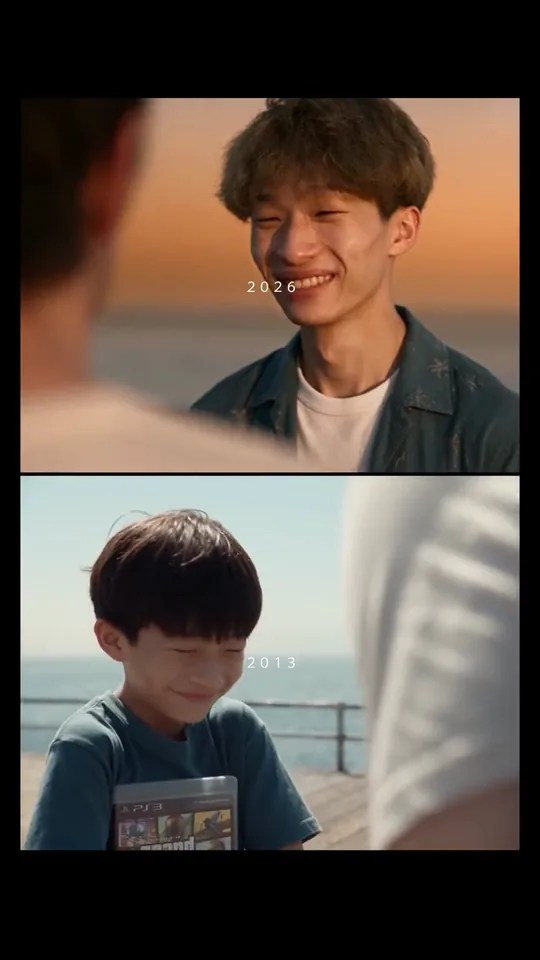
  4. A young adult smiles in the upper panel while a child looks toward the same direction in the lower panel.
    Clip time 6.5 s

    The warm smile

    The young adult smiles in warm backlight, and the lower child panel keeps the same gaze toward the off-camera partner.

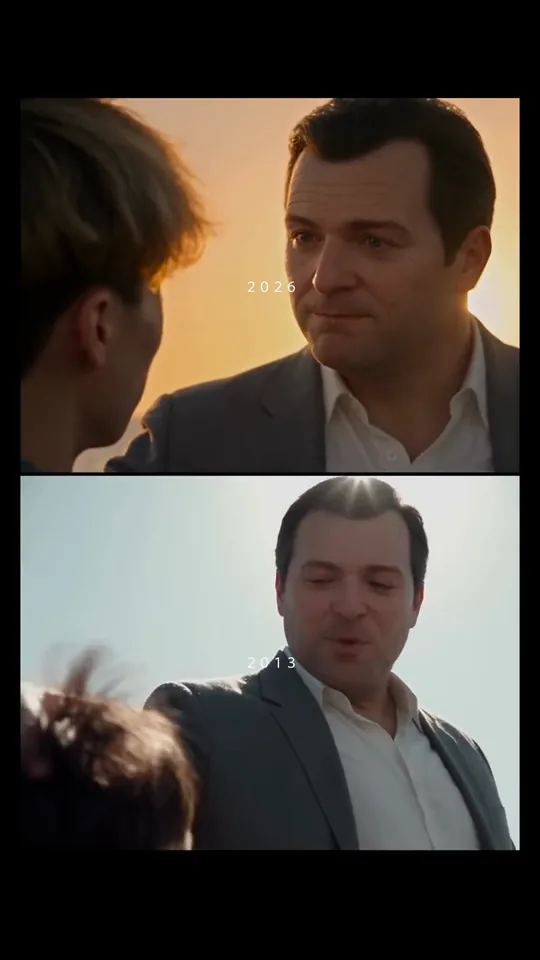
  5. A suited adult reaches down toward a child’s head in the upper panel while the lower panel mirrors the contact.
    Clip time 8.8 s

    The farewell touch

    A suited adult lowers a hand onto the child’s head, making the goodbye gesture legible across the paired panels.

  6. A front-facing young adult appears above a child counterpart standing beside a waterfront railing.
    Clip time 11.6 s

    The final pair

    The montage settles on a front-facing adult close-up above the child counterpart, giving the farewell a clear closing pose.

Step by step

How do you make a GTA5 Goodbye AI video?

Choose Human, upload one clear adult photo, and press Generate. The generated lower frame follows the adult identity automatically, while a second portrait can be added when you want extra control.

  1. 01Step 1

    Add the adult lead photo

    Use a sharp, clear adult photo with visible eyes and an uncluttered face. This photo is the required identity source for the adult lead and the lower frame.

  2. 02Step 2

    Add a second portrait when you have one

    The second photo is optional. When present, it adds age-specific facial cues while the adult photo remains the lead identity. Leave it empty when you want the system to derive the younger appearance from the adult photo alone.

  3. 03Step 3

    Generate and download

    The generator keeps the upper adult panel, lower frame, original sound, and hard-cut order together. The 9:16 crop leaves head-and-shoulder space for both panels. Choose a full-body source when possible because the opening walk keeps the subject visible through the tall frame. Download the vertical file when it finishes, then share it as a GTA5 goodbye video.

Who to cast

What does the GTA5 goodbye meme need?

The GTA5 goodbye trend fits someone who can play a sincere farewell while the age switch carries the humor. The Human version works when one adult identity appears in both panels.

  • Human · 1 photo

    The GTA5 goodbye friend who says goodbye seriously

    Human takes 1 photo. A straight-faced adult close-up makes the younger counterpart and the hand-on-head goodbye land as the joke.

  • Human · optional younger photo

    A parent and their younger self

    The stacked panels make the same person read across two ages without adding another required upload.

  • Human · 1 required photo

    The friend group’s quiet storyteller

    Human takes 1 photo. @mulin650’s farewell framing gives a reserved storyteller a small cameo before the close reactions.

Why here

Do you need a GTA5 Goodbye template?

No. TikTok tutorials describe a photo-led GTA5 goodbye route, but this generator keeps the split-screen timing and the child likeness rule together in one browser flow.

Ways to make it
2 Rows
Way to make itWhat you needWhat you get
((A TikTok tutorial routehttps:
www.tiktok.com/@mulin650/video/7709126566411783438))
An external tutorial route and your photo
This generatorOne adult photo, with an optional second portraitA 13-second 9:16 Human video with the stacked adult-and-child montage
← Swipe horizontally to view full parameters →

The GTA5 goodbye template idea stays recognizable, while the optional child photo gives you a direct way to guide the younger likeness.

  • Route

    Keep the farewell in one browser render

    Use one adult photo in a browser and receive the paired farewell as one vertical video, with a second portrait available for extra age guidance.

  • Likeness

    One adult photo anchors both ages

    Start with one adult photo. A second portrait can add an age-specific cue when you have one.

  • Format

    A 9:16 farewell is ready for social posts

    The portrait cut keeps both stacked panels readable on a phone without asking you to edit the layout first.

  • Trust

    The Editorial demo shows the real split

    The demo keeps the adult panel, child panel, waterfront light, greeting, close reactions, and head touch visible before you upload anything.

Copy and paste

Is there a GTA5 goodbye prompt?

Yes. The public prompt card explains the split-screen scene and each action so you can understand the GTA5 goodbye video before spending credits. Searches for a gta5 goodbye prompt can use that card. You do not need to paste it anywhere to use the generator.

Show full details

Human

1 photo · 13 s · 720p · 9:16 · 867 credits

Video prompt

Build a 13-second vertical split-screen farewell beside a waterfront background in warm sunset light. The adult lead is the person in [Image 1], and the lower panel shows a generated child counterpart that keeps the same identity cues. [Image 2] is optional and, when supplied, guides the child likeness only. 00:00–00:02.27: the adult and child panels walk toward the camera through a small group. 00:02.27–00:03.73: both panels cut to a fist-bump exchange. 00:03.73–00:05.67: the adult lead holds a close-up reaction toward someone at the edge while the child counterpart mirrors it. 00:05.67–00:07.43: the adult lead smiles in warm backlight and the child keeps the aligned gaze. 00:07.43–00:10.10: the adult lead places a hand on the child counterpart's head in a gentle farewell gesture. 00:10.10–00:12.65: return to the adult's front-facing close-up with the child standing below. Keep the original cast faces, hairstyles, green jacket, white T-shirt, gray suit and accessories out unless [Image 1] shows them, preserve the split-screen framing and supplied audio, and add no new text, logos or watermarks.
Credits

How much does a GTA5 Goodbye AI video cost?

Human is the only version here, and one required adult photo is enough to start. Credits depend on the 13-second length and the quality you choose, with 720p and 1080p portrait variants available.

Specs and credits
2 Rows
VersionPhotosLengthFormatQualityCredits
Human113 s9:16720p867
Human113 s9:161080p1,300
← Swipe horizontally to view full parameters →

Start with one adult photo at 720p for the lowest-cost GTA5 goodbye AI render; the second portrait remains optional.

The smallest one-time pack that covers the dearest version is $9.90 for 1,500 credits; credits do not expire. See pricing and credit packs.

Troubleshooting

Why does my GTA5 Goodbye video look wrong?

The most common problems are a weak adult face source, a younger panel that loses the identity match, or a crop that hides the walking action. Use the repair row that matches the visible problem, then rerun Human.

Problems and fixes
5 Rows
ProblemFix
The adult lead keeps an original cast hairstyle or faceThe input montage contains several recognizable adult faces in close-up. Use a sharp adult face photo with the desired hair and rerun Human.
The generated child counterpart does not resemble the adult inputThe uploaded photo does not show a clear face or enough identity detail. Replace it with a front-facing, well-lit adult photo and rerun Human.
The two panels drift out of sync during the greetingThe fist-bump action is short and the source uses a hard cut. Use the full-body adult photo and rerun the same Human option.
The adult lead is cropped out of the walking shotThe opening composition shows the body moving through a group in a tall frame. Choose a photo with the head and shoulders clearly visible and rerun Human.
The photo is refused by the upload checkSome photos do not pass the input review. Try another photo of a person who agreed to its use; a failed run follows the refund policy.
← Swipe horizontally to view full parameters →

A clearer face photo is the first repair for both age panels; add the optional second portrait when the younger likeness needs another cue.

Posting

How do you post a GTA 5 goodbye edit?

The GTA 5 goodbye edit is usually framed as a GTA 5 farewell and is shared with a short caption about the age change. A dated TikTok tutorial caption says “Upload your photo and put yourself into the emotional GTA 5 farewell scene with AI.” Read the tutorial post

Hashtags

Keep the original sound that comes with the generated file, add an AI label if the platform requests one, and use a caption that says the child counterpart follows the identity in your adult photo. Hashtags such as #gta5goodbye, #gta5goodbyetrend, and #gta5trend appeared on the opened posts. See a GTA5 goodbye trend post

FAQ

What else do people ask about GTA5 Goodbye AI?

How does photo privacy work for this video?

Upload only an image you are allowed to use, and read the privacy policy for retention details. The GTA5 goodbye flow does not change that policy.

Can I add a real child photo to GTA5 Goodbye AI?

Yes, a second photo is optional. It guides the younger appearance when present, while the adult photo remains the required identity source.

Does the younger panel automatically match the adult photo?

It is designed to follow the adult photo’s identity cues. A sharp direct-to-camera photo gives the generator more detail, and a second photo can add age-specific guidance.

Can I use a group photo for the GTA5 goodbye scene?

No. Use one adult source for the lead. A separate younger portrait can be added as the second photo when you want extra guidance.

Can I post it on TikTok?

Yes. Export the vertical file, keep the original sound, and follow TikTok’s current AI-label and privacy prompts.

How is this different from Viggle or Higgsfield?

The GTA5 goodbye sequence stays fixed while your adult identity carries through both ages. Viggle and Higgsfield offer broader character or prompt workflows on their own sites.

Is this a real GTA 5 scene or a real stunt?

No. It is an AI-generated farewell montage built from the source video. Do not stage the gestures or treat the clip as live footage.
✨Make Video With Your Photos

Make Your GTA5 Goodbye AI Trend Video Now

Upload one adult photo, add a second photo only if you want it, and generate the stacked farewell montage.

Written and maintained by MemeVideoMaker Editorial DeskPublished Last updated