AI trend

POV Outfit Change AI: Show Six Looks in One Handheld Story

The POV outfit change AI trend is a handheld look-by-look reveal that moves from a shopfront to an interior and a stone arcade. Upload 6 photos to make a 9-second montage with reference audio, ready in 2–5 minutes.

Each look owns a different reveal beat, so one person can appear in six distinct outfits without hand-editing the cuts.

POV OUTFIT CHANGE AI
VIRAL RIG
6 Photos9s HD

POV OUTFIT CHANGE AI

Upload 6 full-body looks to make a 9-second vertical POV outfit-change montage with hand-held props and the supplied audio.

Swipe ⟷
Example

What does the pov outfit change video look like?

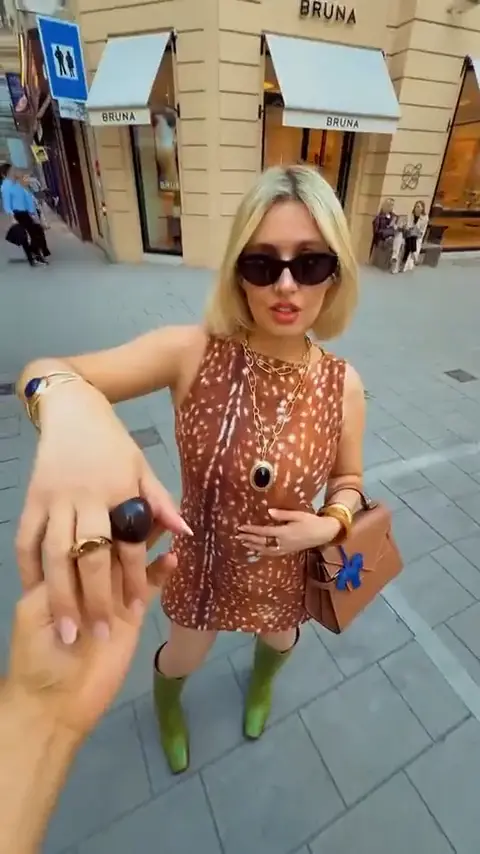
The Editorial demo follows the reference camera as a hand presents small objects, a cushion, a phone, a drink and a flower-shaped prop. Your six photos replace the performer look by look while the street, leopard-print room, stone columns and final red-look hold stay in the montage.

Human
9:16 Vertical·Clean MP4
Ready to Remake

Upload your photo to star in this exact scene in 3 minutes.

Remake ↑
Step by step

How do you make the pov outfit change video with your photo?

The POV outfit change setup is one Human version with six required photos. The pov outfit change trend and pov outfit change meme both use the same six-look route. This pov outfit change video keeps the mapped sequence. Choose the six looks first, then let the preset carry the timing, props and vertical framing.

  1. 01Step 1

    Add your photo

    Use six full-body photos with each face and outfit visible. The first reveal is close to the shopfront, while later beats bring a phone, drink and pink prop near the hands, so avoid cropped legs or covered shoulders. Uploaded photos are handled under the privacy policy.

  2. 02Step 2

    Press Generate

    The button shows the price before you run it. The preset keeps the camera hand, prop scale, scene cuts and reference audio while each photo takes its mapped look. Keep the hand and prop edge visible in every reveal.

  3. 03Step 3

    Download or share

    The result is a 9-second 9:16 video at the available quality options. Download the vertical cut for a short-form post, or send it to a friend who will recognize the six-look setup before the last red-look reaction.

The trend

Where did the pov outfit change trend start?

The specific origin of this POV outfit change clip is not verified, so this page makes no claim about an original creator, date, sound name or usage count. The visible format is clear: a first-person hand offers an object, a new look appears, and the final outfit holds on camera.

Earliest dated post
1 August 2026
Latest dated post
6 November 2026
Platform
TikTok
Posts in the timeline
3

The format sits inside the wider outfit-transition language used for short vertical fashion videos, but the reference here adds a prop-led POV hand and a sequence of six mapped looks.

  1. TikTok

    The public record does not verify the original creator or the clip's origin details. See the post

  2. TikTok

    A recorded top-post role is present, but its public metrics and caption are not verified here. See the post

  3. TikTok

    A tutorial role is recorded, but its instructions and caption are not verified here. See the post

Who to cast

Who do people cast in the pov outfit change meme?

Choose a person whose outfits can carry six quick entrances. The joke comes from the hand arriving with a new object and the look appearing before the viewer can reset.

  • Human · 6 photos

    POV outfit change friend with six looks

    A friend who treats every outfit as a character entrance fits the shopfront reveal and the final red-look hold. Use 6 photos with the small black round object and red jacket beats readable through the fast cuts. The dated post by @_reyeseh is recorded on 1 August 2026.

  • Human · prop reactions

    POV outfit change pink phone reactor · 6 photos · black-and-white floor

    Someone comfortable reacting to a phone, drink or flower-shaped prop gives the hand-held POV its rhythm. Keep the shoulders and hands clear in the source photos so the close reactions do not hide the outfit.

  • Human · vertical montage

    POV outfit change stone arcade storyteller · 6 looks · tan shoulder bag

    A person with 6 distinct looks makes the leopard-print interior, patterned cushion and stone arcade feel like separate entrances. Use consistent framing and leave the clothing unobstructed from head to shoes.

This pov outfit change setup is a poor fit for photos where the subject is hidden behind a group, a heavy crop or a large foreground object. The fast look swaps need one readable person per upload.

Why here

Why make the pov outfit change video here?

The Human preset turns six looks into one mapped sequence. You select the people and outfits; the reference keeps the hand-held reveal logic and the location changes.

  • Preset

    Six looks in the BRUNA shopfront at 9 seconds

    The Human version maps six uploaded full-body looks across the shopfront, leopard-print interior and stone arcade beats.

  • Fidelity

    The pink phone and green drink with straw stay in frame

    At 00:03, the pink phone and black-and-white floor keep the stone arcade beat readable.

  • Identity lock

    Outfit identity across 6 red jacket looks with the tan shoulder bag

    At 00:06, the tan shoulder bag and pink flower-shaped prop anchor the red jacket. The prompt assigns each look to its own beat and blocks the source hair, clothes, accessories and body proportions from leaking into the uploaded person.

  • Format

    A 00:07 vertical ending in the stone arcade columns with a pink flower-shaped prop

    At 00:07, the stone arcade columns hold the final 9-second vertical frame, so the red-look reaction has a clear finish for short-form sharing.

Copy and paste

The pov outfit change prompts

You do not need these prompts to make a clip. They are public so you can see how the six looks are assigned to the shopfront, leopard-print room, phone, drink, pink prop and final hold.

Show full details

Human

6 photos · 9 s · 720p · 9:16 · 600 credits

Video prompt

A handheld vertical POV montage moves from pale stone paving outside a BRUNA shopfront to a leopard-print interior and a bright stone arcade. A hand presents a small black round object, a patterned cushion, a pink phone, a green drink with straw and a pink flower-shaped prop as the setting jumps between looks. The person in [Image 1] appears in the first shopfront look, [Image 2] in the leopard-print room, [Image 3] in the phone reaction, [Image 4] for the drink beat, [Image 5] for the pink prop and [Image 6] in the final red look. Keep each person's face, hair, skin tone and full outfit from the matching photo.
00:00.00–00:01.50: advance toward the empty shopfront while a hand raises the black object.
00:01.50–00:02.25: reveal [Image 1] close to the storefront and hold the reaction.
00:02.25–00:03.20: switch to [Image 2] beside the patterned cushion under the amber chandelier.
00:03.20–00:04.54: show [Image 3] with the pink phone between the stone arcade columns.
00:04.54–00:06.12: use [Image 4] for a sip from the green drink with straw.
00:06.12–00:06.79: let [Image 5] react as the pink flower-shaped prop enters from the POV hand.
00:06.79–00:07.54: continue the same red-jacket reaction and keep the tan bag at the edge.
00:07.54–00:09.00: finish on [Image 6] centered in the arcade. Keep the first-person hand, prop scale, location cuts and supplied audio timing, but leave out the source performer's face, hair, clothes, accessories and body proportions unless a matching photo contains them. Add no text, logos or watermarks.
Credits

How many credits does the pov outfit change video cost?

The Human version is priced per render, and the button shows the current amount before you confirm. If a run cannot proceed, use the refund policy for the return rules.

Credits by version
2 Rows
VersionSettingsCredits
Human9 s, 720p, 9:16600
Human9 s, 1080p, 9:16900
← Swipe horizontally to view full parameters →

The dearest version here is 900 credits, and the smallest one-time pack that covers it is $9.90 for 1,500 credits. Credits are bought once and do not expire. See pricing and credit packs.

Second by second

What happens in the pov outfit change video, second by second?

The reference supplies the camera path, hand-held objects, location cuts and reaction timing. Your six photos replace the performer look assigned to each beat, from the first shopfront appearance through the final red-look hold.

Show full details
Second by second
8 Rows
TimeWhat happensHuman
0 to 1.5 sHandheld POV outside a shopfront, a hand raises a small black round object while the camera advances over pale paving.You hold the opening object toward the lens and let the empty street set up the reveal.
1.5 to 2.25 sA close street reveal shows the first look in a brown sleeveless top, green boots, sunglasses and a tan bag.You face the camera in the first uploaded look and hold the close reaction.
2.25 to 3.2 sA warm leopard-print interior appears with the second look, a pale patterned cushion and a large amber chandelier.You present the second uploaded look beside the cushion as the POV hand stays in front.
3.2 to 4.54 sThe view jumps to a bright stone arcade where the third look holds a pink phone and gestures near the face.You use the third uploaded look for the phone reaction and keep both hands readable.
4.54 to 6.12 sOutside the arcade, the fourth look in a light jacket and brown skirt takes a sip from a green drink.You bring the fourth look to the straw for the short drink beat without changing the set.
6.12 to 6.79 sThe fifth look appears in a red jacket as a pink flower-shaped prop is offered from the POV foreground.You react to the pink prop in the fifth uploaded look while keeping the bag at the side.
6.79 to 7.54 sThe red-jacket look stays centered in the stone arcade as the reaction continues and the tan bag remains at the edge.You keep the sixth uploaded look steady through the first part of the closing reaction.
7.54 to 9 sThe same red-jacket look holds the final close frame with the POV hand and tan bag at the edges.You finish the sixth uploaded look without adding a new location, prop or character.
← Swipe horizontally to view full parameters →

The beats map each uploaded look to a separate reveal beat. The 9-second cut stays vertical while locations change.

Every cut is a 9-second 9:16 result with the reference audio. The 9-second cut stays vertical while locations change, and the same six photos can produce different motion details on another run.

Troubleshooting

What goes wrong with the pov outfit change video, and how do you fix it?

Most problems come from cropped or obstructed photos. Start with full-body looks, keep the face readable, and rerun the affected sequence when a prop or outfit loses its place.

Problems and fixes
5 Rows
ProblemFix
The shopfront opening loses its pale paving and the first reveal feels disconnectedThe reference depends on the BRUNA shopfront and pale stone paving as the opening anchor. Use six photos with the full body visible, then run the Human version again.
The interior look inherits the leopard-print room instead of the uploaded outfitThe source performer remains visible around the patterned cushion and leopard-print interior. Replace the affected photo with a clear full-body look and run the same version again.
The phone or drink becomes oversized during a close reactionThe pink phone and green drink are small hand-held props in the reference framing. Choose a photo where both hands and the upper body are visible, then rerun the Human version.
The final red look loses the pink prop or tan bag at the frame edgeThe last two beats keep the pink flower-shaped prop and tan shoulder bag near the foreground. Use a full-body source photo with the pose unobstructed and rerun the final look sequence.
A photo is rejected before the six-look sequence can startThe uploaded image may be too small, unclear or contain a mismatched subject. Upload another permitted photo and retry; see the refund policy if the run cannot proceed.
← Swipe horizontally to view full parameters →

Use full-body photos with the outfit and pose unobstructed.

FAQ

pov outfit change questions

What is this AI trend?

It is a vertical POV montage where a hand presents an object and a new outfit appears in the next reveal. This version maps six uploaded looks to a 9-second sequence.

Where did the pov outfit change trend start?

The specific source clip has no verified public origin record here. The visible format is a prop-led handheld reveal that moves through several locations and ends on a held outfit reaction.

How do I make the pov outfit change AI video with my photo?

Upload six full-body photos, keep the face and clothing visible, accept the displayed price and run Human. The preset maps each upload to its own reveal beat.

Do I need the pov outfit change CapCut template?

No. The Human preset carries the six-look timing and prop beats in one browser flow, so you can create the montage without assembling a CapCut timeline.

Is there a pov outfit change prompt?

Yes. The pov outfit change prompt on this page describes the six mapped looks, the hand-held props, the location cuts and the final hold. The one-click flow uses it for you.

Can my dog or cat do this?

This version is for one person with six outfit photos. A pet does not fit the six-look clothing mapping because the beats depend on readable human outfits and hand-held prop reactions.

Is the pov outfit change real?

It is an AI-generated recreation of a visual format, not a live clothing change. Keep the platform’s AI label when you share the result.

Why does one look lose its outfit details?

A crop, dark face or covered torso can leave the model too little clothing information for a quick reveal. Replace that look with a clear full-body photo and rerun.

Can I use different backgrounds in the six photos?

Yes. The source locations and handheld props provide the scene. Keep the person and outfit visible in each upload so the six transitions remain easy to read.
✨Make Video With Your Photos

Make Your POV Outfit Change AI Video Now

Put six looks into one handheld reveal and let the story do the cutting.

Written and maintained by MemeVideoMaker Editorial DeskPublished Last updated